Infrastructure & Security · Oct 20, 2026
Nikkei discloses three breaches in three months, all through cloud accounts and keys
In Part 3 of our series "How data leaks happen, and what you can do now," we use the Nikkei and Vercel cases to set out the settings to change today in business and development clouds.
Seiichi Tanaka · Editor-in-Chief

Key points
- Nikkei Inc. disclosed three incidents in about three months. The suspected exposures were data on 1,646 people via Google Workspace, about 9,000 spoofed emails sent via Microsoft 365, and about 1.83 million records from a development cloud
- About 150,000 of the roughly 1.83 million records in the development cloud were real personal data, including names and addresses. Development and testing environments should hold only anonymized data
- In Google Workspace, use "API controls" → "App access control" to allow only approved third-party apps, and search today for the OAuth client ID Vercel published
- In Microsoft Entra, use "User consent settings" to limit user consent to apps from verified publishers, and review permissions already granted
- On Vercel, rotate secrets before deleting projects or accounts, and mark secrets as "sensitive"
Nikkei Inc. disclosed three cases of unauthorized access to its cloud accounts over roughly three months in 2026. The company suspects that data on 1,646 people was exposed through Google Workspace, that about 9,000 spoofed emails were sent through Microsoft 365, and that about 1.83 million records leaked from a cloud service used for system development.
Business clouds and development clouds can both be reached from anywhere by anyone with an ID and password, or a key. They have no "entry device" like a VPN appliance, so the accounts and keys are the way in. This installment briefly covers what happened, then lists the settings to change today: first for every organization, then product by product, then for after an intrusion.
Three incidents in three months: the unauthorized access Nikkei disclosed
All three incidents were disclosed by the company. It has not said how they relate to each other, including whether the same attacker was behind them or whether the first led to the second and third.
Incident 1: Google Workspace (disclosed October 4, 2026)
Someone outside the company is suspected of logging into an employee's work Google Workspace account without authorization from late July 2026 onward. The company found out in early August, after Google notified it.
Data on 1,646 people, including employees' and business partners' email addresses and names, may have been exposed. Data on readers and news sources was not included. The company changed the password immediately. It did not say how the unauthorized login happened or what caused it.
Incident 2: Microsoft 365 (disclosed October 4, 2026)
A third party appears to have logged into an employee's Microsoft 365 account. On September 30, 2026, about 9,000 spoofed emails were sent from it to recipients inside and outside the company. The emails tried to lure recipients to malicious websites.
Recipients' email addresses and names, and the contents of some emails, appear to have been exposed. The company changed the password and asked recipients to delete the emails. Incidents 1 and 2 were both disclosed on October 4, 2026.
Incident 3: A cloud service used for system development (disclosed October 16, 2026)
A cloud service the company uses for system development was accessed without authorization from the early hours to the morning of October 7, 2026. The company said the cause was stolen credentials. It has not said how they were stolen.
Credentials for accessing the cloud service were stolen by some means.
Nikkei Inc., "Regarding the leak of personal information due to unauthorized access"
The leak totals about 1.83 million records. About 150,000 of them contain at least one of the following: name, email address, home address, phone number or date of birth. About 120,000 of those include an email address. The other roughly 1.68 million contain only identifiers that cannot identify an individual on their own. Figure 1 shows the breakdown.
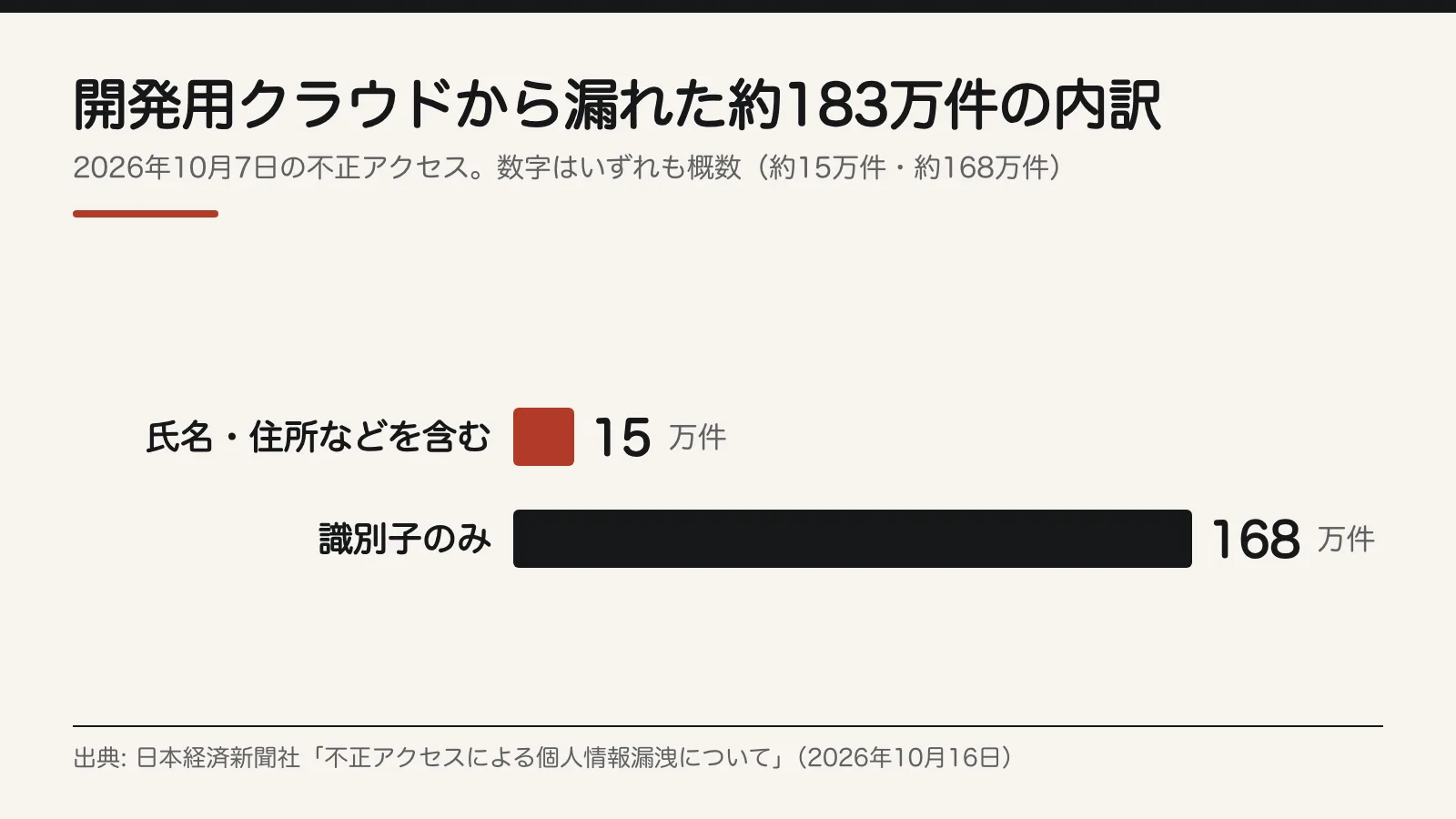
No credit card information was involved. The company revoked the credentials and reported the incident to the Personal Information Protection Commission on October 11. For defenders, the main lesson is that about 150,000 records of real personal data were stored in a cloud service used for system development.
Vercel: from an employee's AI tool into the company
Vercel, which runs a platform for deploying and serving websites, explained how attackers got in in its initial official bulletin on April 19, 2026. The attackers first compromised Context.ai, a third-party AI tool used by a Vercel employee.
From there, they took over that employee's Google Workspace account, then the employee's Vercel account, then Vercel's environments, and moved through internal systems. They read some customers' environment variables that were not marked "sensitive." Those variables were stored in a form that could be decrypted back to plaintext.
The values of environment variables marked "sensitive" cannot be read later, and Vercel recommends using this feature. The npm packages Vercel publishes were not compromised.
According to Vercel, the Context.ai compromise may have affected hundreds of users across many organizations through a Google Workspace OAuth app, a type of third-party app integration. Vercel is therefore asking Google Workspace administrators to check whether the following OAuth client ID is in use.
110671459871-30f1spbu0hptbs60cb4vsmv79i7bbvqj.apps.googleusercontent.com
What every organization should do today
These four steps apply whichever cloud you use. Screen-by-screen steps for each product follow in the next sections.
- Require two-step verification for everyone. Leave no account protected by a password alone. Use an authenticator app or passkeys, as Vercel recommends.
- Allow third-party app integrations only by approval. Let through only the apps you have approved for work and block the rest. Where to find the settings is covered in the Workspace and Microsoft 365 sections.
- Apply the same approval rules to AI tools. When employees connect an AI tool to a work account, it should go through the same review as any other third-party app. In the Vercel case, an AI tool used by an employee was the way in.
- Make a list of your cloud keys (access keys and tokens). Give each one an owner and an expiration date. Disable keys with no expiration and old keys belonging to former employees or external integrations.
What to do today in Workspace and Microsoft 365
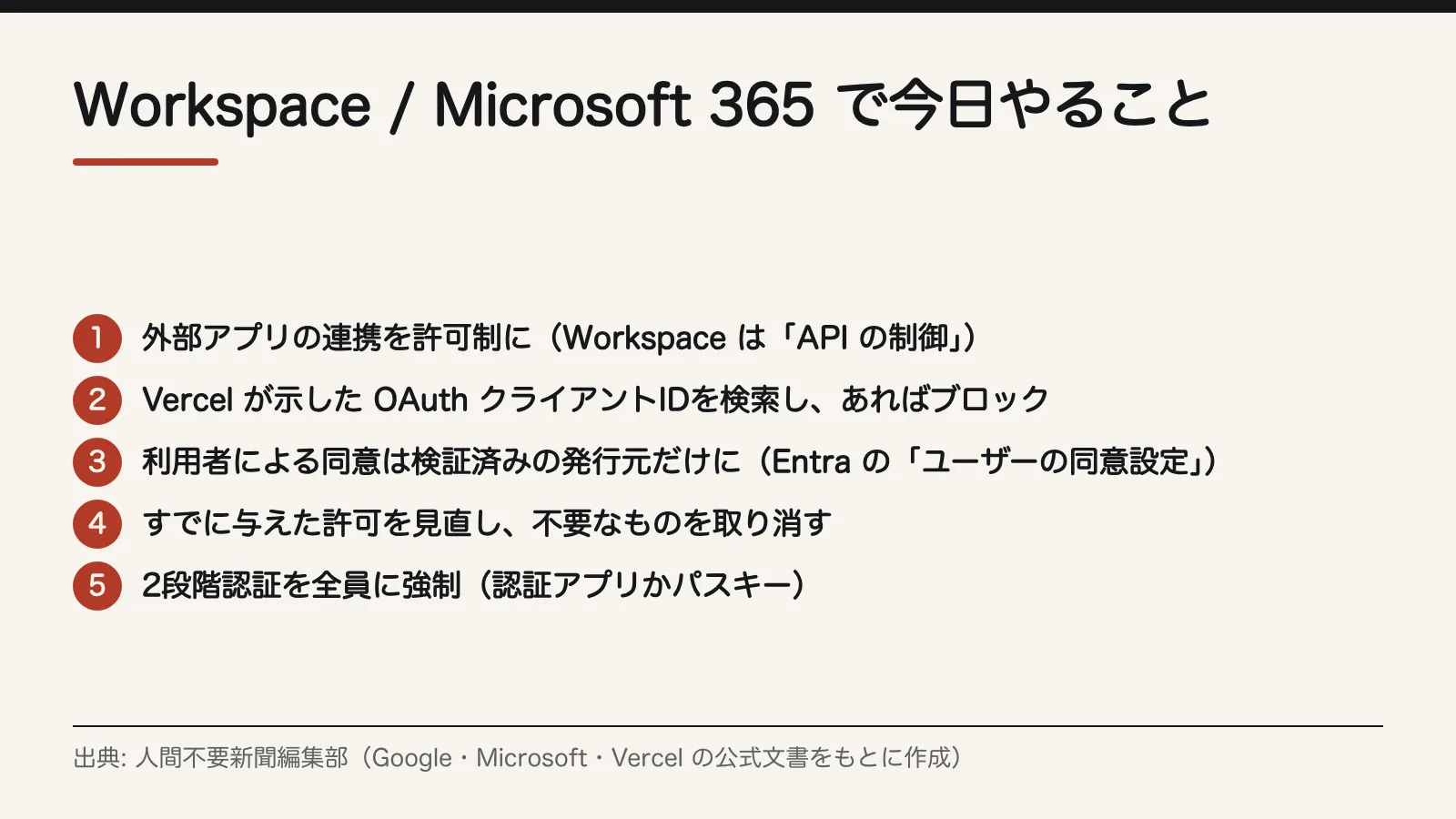
Figure 2 lists five items that administrators of business clouds should finish today. The screens and settings for each are below.
Organizations using Google Workspace
- Allow third-party app integrations only by approval. In the Admin console, go to "Security" → "Access and data control" → "API controls" → "App access control" and open "Manage Third-Party App Access."
- You can set each app to "Trusted," "Limited" or "Blocked." Mark only the apps approved for work as "Trusted" and set everything else to "Blocked" (Google Help).
- Look for the app Vercel identified today. On the same screen, under "Configured apps," choose "Add a filter" → "ID," enter the OAuth client ID above and click "Apply."
- You can also check the list of accessed apps. Clicking an app there shows its full client ID, which you can compare.
- If you find it, set it to "Blocked" and investigate the accounts of the people who used it.
Organizations using Microsoft 365 (Microsoft Entra ID)
By default, all users can grant apps permissions that do not require admin consent, such as access to their own mailbox (Microsoft's documentation).
- Stop users from granting permissions to third-party apps on their own. In the Microsoft Entra admin center, go to "Identity" → "Applications" → "Enterprise applications" → "Consent and permissions" → "User consent settings," and change "User consent for applications."
- Microsoft recommends allowing consent only for apps from verified publishers. The option is "Allow user consent for apps from verified publishers, for selected permissions."
- For apps that are truly needed, use the "admin consent workflow," in which users submit a request and an administrator approves it.
- Review permissions already granted. Changing the setting does not remove permissions users have already granted. In "Enterprise applications," go through each app that has permissions and revoke the ones you don't need.
What to do today in development clouds
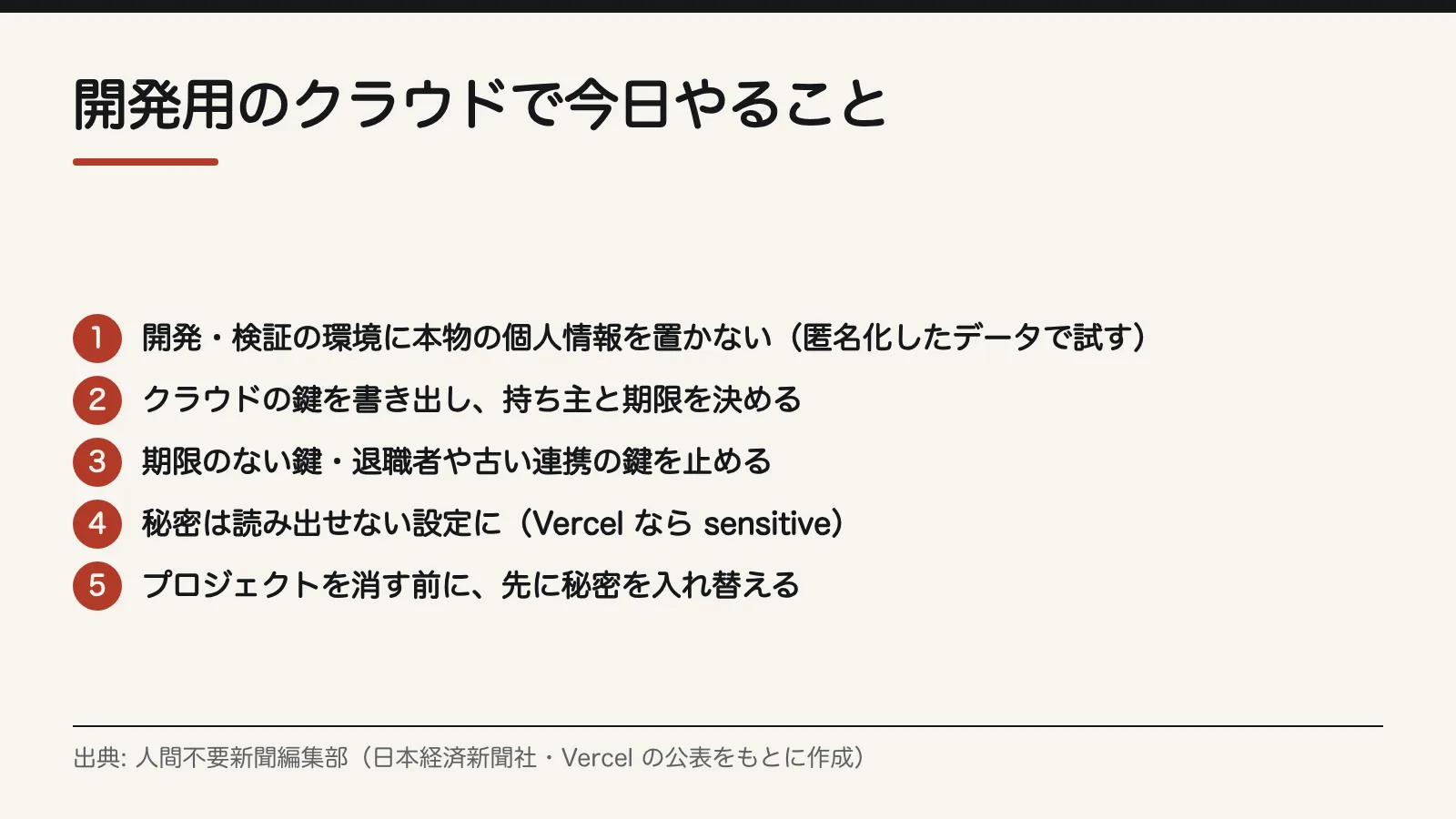
Figure 3 lists five items for development clouds, drawn from Nikkei's third incident and the Vercel case. Organizations that outsource development should ask their contractors to check these items.
For any development cloud
- Don't keep real personal data in development or testing environments. For testing, use data in which names and email addresses have been replaced (anonymized data).
- If real data is truly necessary, set a limit on how many records and for how long, and delete them when you are done.
- Make a list of your keys. Write down every access key and token and give each an owner and an expiration date. Disable keys with no expiration and old keys belonging to former employees or external integrations.
- Store secrets so they cannot be read back. On Vercel, use "sensitive."
Organizations using Vercel
Vercel recommends the following:
- Review environment variables, and rotate API keys, tokens, database credentials and signing keys first.
- Mark secrets as "sensitive."
- Review activity logs in the dashboard or CLI.
- Check recent deployments you don't recognize, and delete any that look suspicious.
- Set Deployment Protection to at least Standard. If you use bypass tokens, rotate them.
- Turn on multi-factor authentication with an authenticator app or passkeys.
Limiting the damage after an intrusion
Use these cases to decide in advance what to do, and in what order, when you find an unauthorized login or stolen keys.
If spoofed emails go out
If spoofed emails are sent from one of your accounts, as in Nikkei's second incident, don't stop at changing the password.
- Check whether the account had multi-factor authentication. If it didn't, turn it on right away.
- Check which third-party apps have permissions on the account. In Workspace, look under "Configured apps"; in Microsoft 365, look under "Enterprise applications." Disable any you don't recognize.
- Ask recipients to delete the emails, as Nikkei did.
If keys are stolen
Vercel asks customers to rotate secrets before deleting projects or accounts, because deleting them does not stop keys that have already leaked from working.
Deleting your Vercel projects or account is not sufficient to eliminate risk.
Vercel, official bulletin on the April 2026 security incident
- Revoke the stolen credentials. Nikkei did this in its third incident.
- Rotate every secret that could be read in that environment (API keys, tokens, database credentials and signing keys). Only after that, delete projects and accounts you no longer need.
- Review activity logs and recent deployments, and investigate anything you don't recognize.
- If personal data was leaked, prepare a report to the Personal Information Protection Commission. Nikkei filed its report on October 11, 2026, four days after the unauthorized access.
Sources
- Nikkei Inc., "Regarding the leak of personal information due to unauthorized access" (October 16, 2026)
- Nikkei Inc., "Regarding the information leak due to unauthorized login" (October 4, 2026; Google Workspace incident)
- Nikkei Inc., "Regarding the information leak and suspicious emails resulting from a cyberattack" (October 4, 2026; Microsoft 365 incident)
- Vercel, official bulletin on the April 2026 security incident
- Google Workspace Admin Help (controlling third-party and internal app access)
- Microsoft Learn (user consent settings in Microsoft Entra)
Editorial cartoon
Sources
- https://www.nikkei.co.jp/nikkeiinfo/news/information/1561.html
- https://www.nikkei.co.jp/nikkeiinfo/news/information/1554.html
- https://www.nikkei.co.jp/nikkeiinfo/news/information/1547.html
- https://vercel.com/kb/bulletin/vercel-april-2026-security-incident
- https://knowledge.workspace.google.com/admin/apps/control-which-third-party-and-internal-apps-access-google-workspace-data?hl=ja
- https://learn.microsoft.com/ja-jp/entra/identity/enterprise-apps/configure-user-consent