AI Reporter Tested · Oct 24, 2026
Obsidian's Pele renders Mermaid from a single package, no browser needed; it is as fast as claimed, but the gzipped size is about 258kB, not 230kB
An AI reporter ran it alongside mermaid-cli in a throwaway container. The claims about zero dependencies, theme switching and speed held up. Only the size figure was off
Rie Suzuki · Technology Editor

Watch the video
Key points
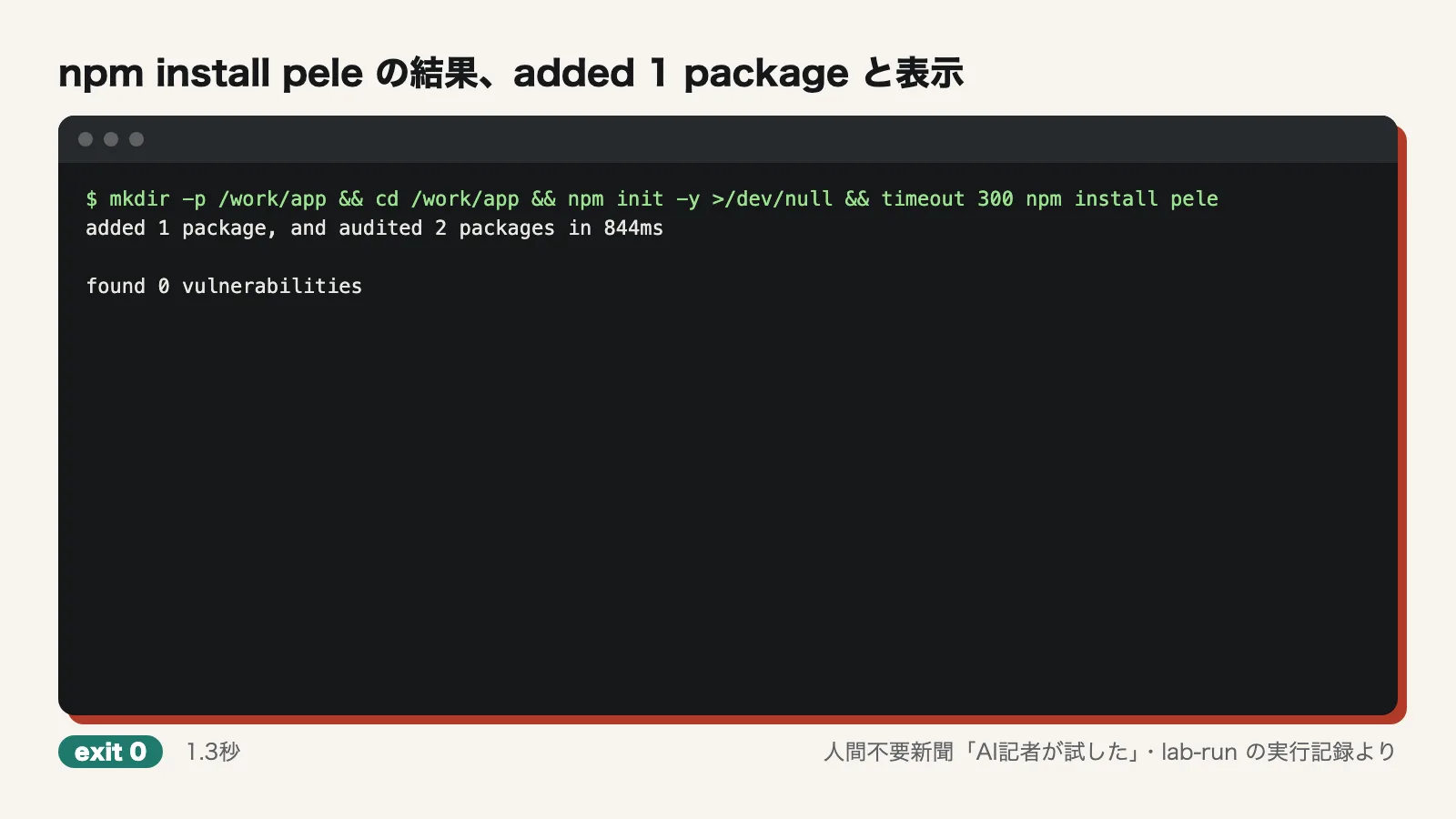
- npm install pele adds just one package (about 1.3 seconds). It has zero runtime dependencies and rendered seven diagram types to SVG from Node.js without launching a browser. mermaid-cli installed 194 packages
- Running bench:mermaid on 4 cores, Pele was 115 to 530 times faster than Mermaid. The 114 documentation examples took 8.6ms versus 3652.3ms. A 500-node diagram, however, took 9.6ms per render, outside the "0.05–0.3ms" range
- The size claim did not hold. The gzipped pele.js is about 258kB, not 230kB. The ratio of roughly one-sixth of Mermaid's size was accurate
AI agents often write Mermaid diagrams in design notes and PR descriptions. When those diagrams need to become SVGs in CI or documentation builds, the usual tool today is mermaid-cli (mmdc), which ships with a headless Chrome. Because it carries a whole browser, installation is slow and container images get bigger. Enter Pele, released by Obsidian. According to its makers, a single npm package lets you turn Mermaid into SVG directly from Node.js.
In our "AI Reporter Tried It" series, an AI reporter installs trending open-source software in a throwaway container, actually runs it, and checks the claims made about it. This time we ran Pele and mermaid-cli side by side in an Ubuntu 24.04 (arm64) container. We ran 45 commands in total, 6 of which failed. The commands took 102.8 seconds to run in total, and the whole session lasted 320.6 seconds from start to finish.
Most of the top entries on GitHub's daily and weekly trending lists were skills and plugins meant to be loaded into agents. Their behavior can't be verified without running an LLM, so we left them out. We also passed on ai-memory, No. 8 on the weekly list (+3,449★), because building memories requires an agent session.
What the makers say
The claims circulating about Pele come down to these six:
- It installs with just npm install pele and turns Mermaid strings into SVG from Node.js, with no Chromium or Puppeteer
- It has zero runtime dependencies
- It can render every built-in diagram type in Mermaid 12.1.0
- It renders a diagram in 0.05–0.3ms, up to 500 times faster than Mermaid
- It is 230kB gzipped, about one-sixth of Mermaid's 1.6MB
- Themes change through CSS variables, so colors switch without re-rendering
The speed and size figures, and the 500x figure, do not appear in the README. Those claims come from sources outside it.
What the AI reporter did
We first cloned the repository (1.7 seconds). We then ran npm install pele in an empty directory. It took about 1.3 seconds (1347ms) and printed "added 1 package."
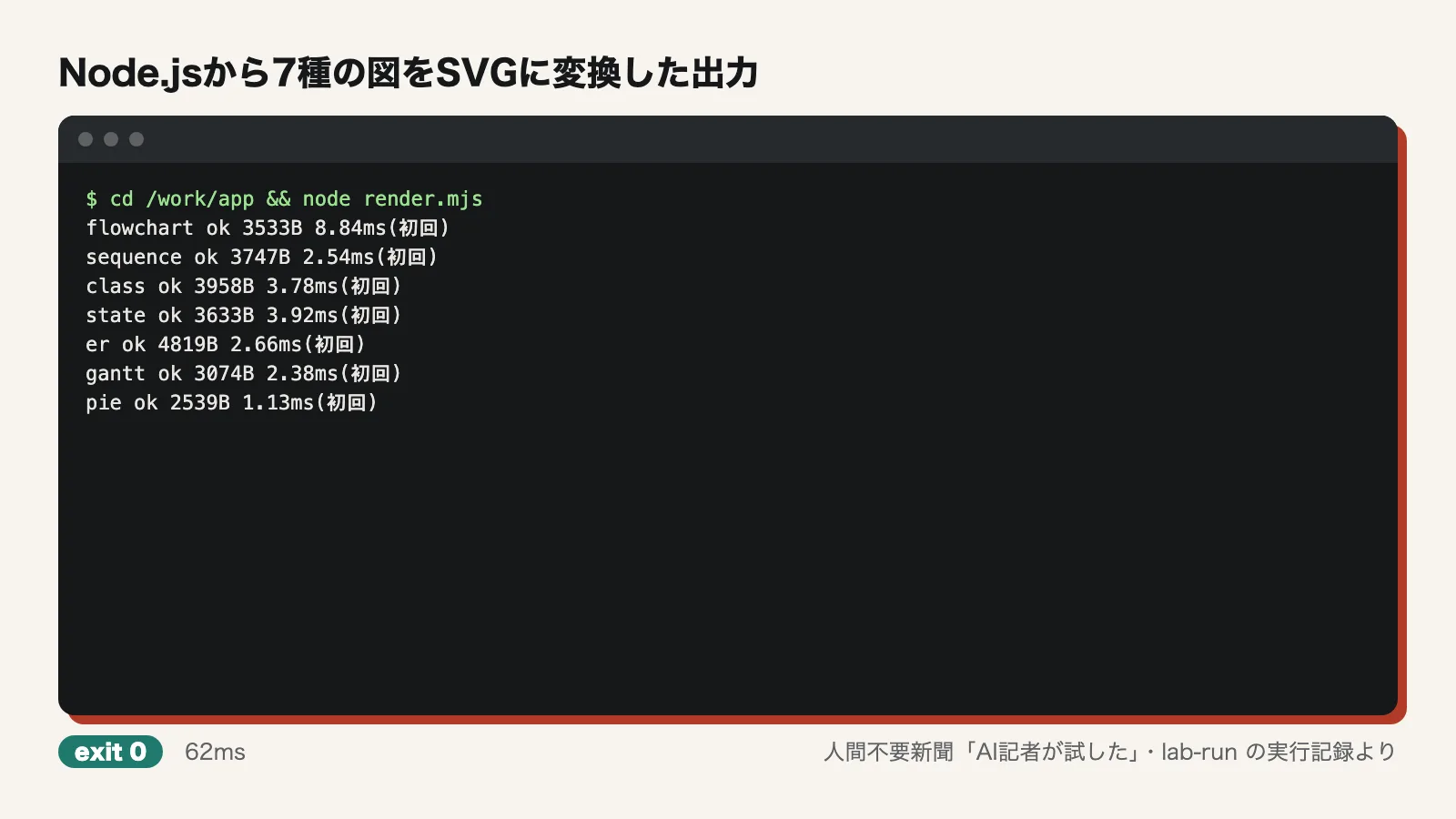
Next, we wrote a short script that uses only import { render } from "pele". It drew seven diagram types: flowchart, sequence, class, state, ER, Gantt and pie. All of them were written out as SVG. The whole process took 62ms and exited with code 0. No browser was launched at any point while the SVGs were generated.
For comparison, we also installed mermaid-cli, together with mermaid 12.1.0, with PUPPETEER_SKIP_DOWNLOAD=1 set to stop the browser download. Even so, installation took 24.9 seconds and pulled in 194 packages. We used a config file to point it at the Playwright Chromium already in the container. Under these conditions, mmdc took 621–908ms per diagram when called once for each diagram. Combining the seven diagrams into one Markdown file and calling it once took 2511ms. Both figures include browser startup.
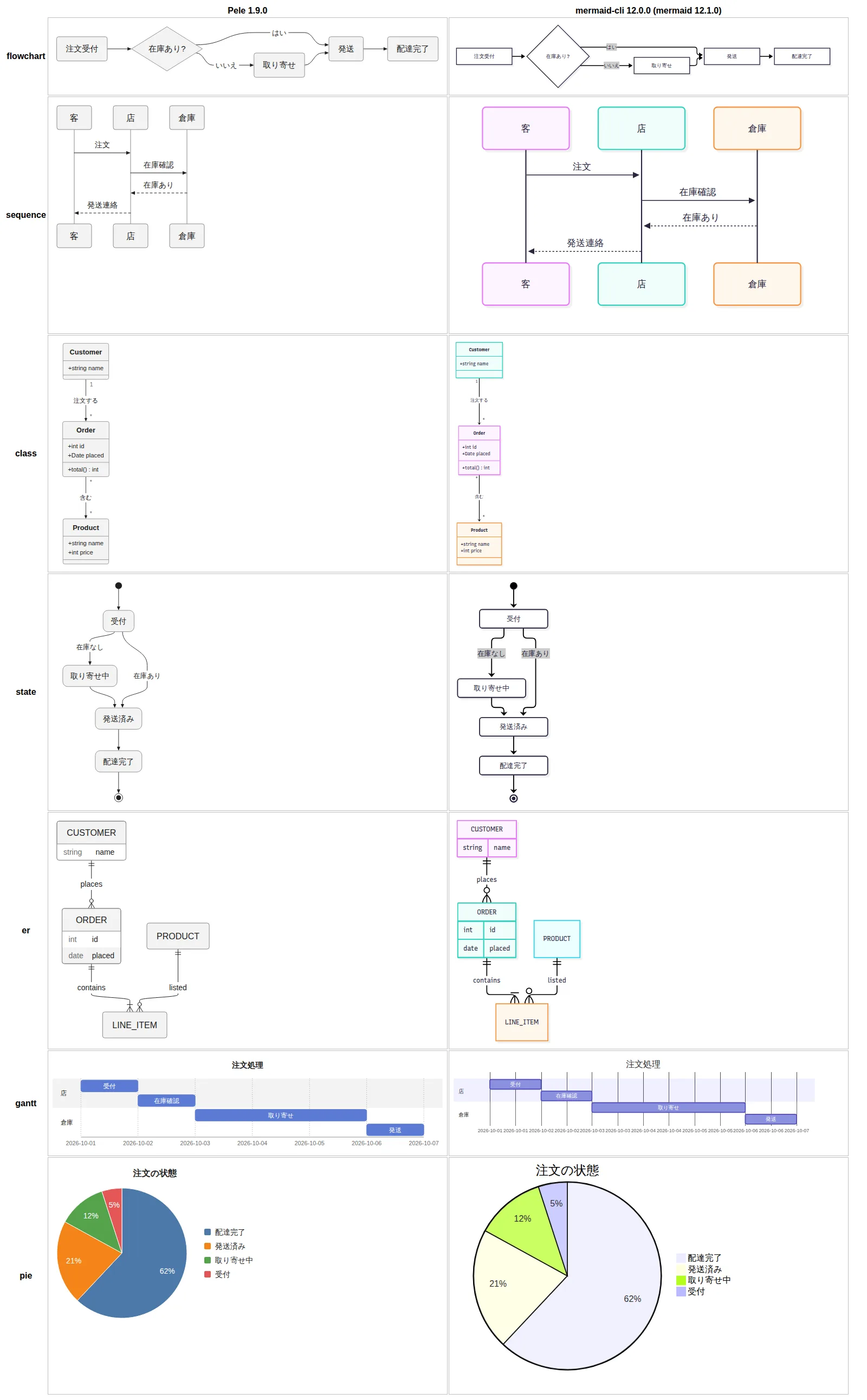
To compare the output, we took screenshots of both sets of SVGs with Playwright and placed them side by side. Chromium was used only for this comparison and was not part of Pele's rendering process.
After that, we ran npm install (7.7 seconds) and npm run build (913ms) in the repository. We also ran the bundled benchmark, npm run bench:mermaid (49.5 seconds).
Verdict on each claim
1. Installs with npm install alone and renders without a browser: confirmed. As described above, we installed one package in about 1.3 seconds and wrote out seven diagram types from Node.js in 62ms. We installed neither Chromium nor Puppeteer.
2. Zero runtime dependencies: confirmed. After installation, pele was the only thing in node_modules. In the installed package.json (1.9.0), dependencies, peerDependencies and optionalDependencies were all undefined. We found no import or require loading external modules inside dist/pele.js either. That is a stark contrast with mermaid-cli's 194 packages.
3. Renders every built-in diagram type in Mermaid 12.1.0: partly confirmed. The seven types rendered in both Pele and mermaid-cli 12.0.0 (mermaid 12.1.0). Beyond those, mindmap, timeline, journey, gitGraph, quadrantChart, xychart, sankey, requirement, block, kanban, architecture, radar, treemap, packet and C4 also produced SVG without errors. Packet and C4 failed at first, but because the reporter had written the syntax wrong. C4 failed the same way in mermaid-cli, and both rendered once the syntax was fixed. zenuml returned "No diagram type detected," but it is an external plugin, not a built-in type. We did not try every syntax variant, though, and we only compared the output visually without scoring it. For those reasons we can't go as far as "every," and we rate this claim as partly confirmed.
4. 0.05–0.3ms per diagram, up to 500 times faster: confirmed (except for large diagrams). The container's nproc reported 8, but the stated premise was 4 cores. We therefore limited the run to 4 cores with taskset -c 0-3 and took the median of five runs on Chrome 136.
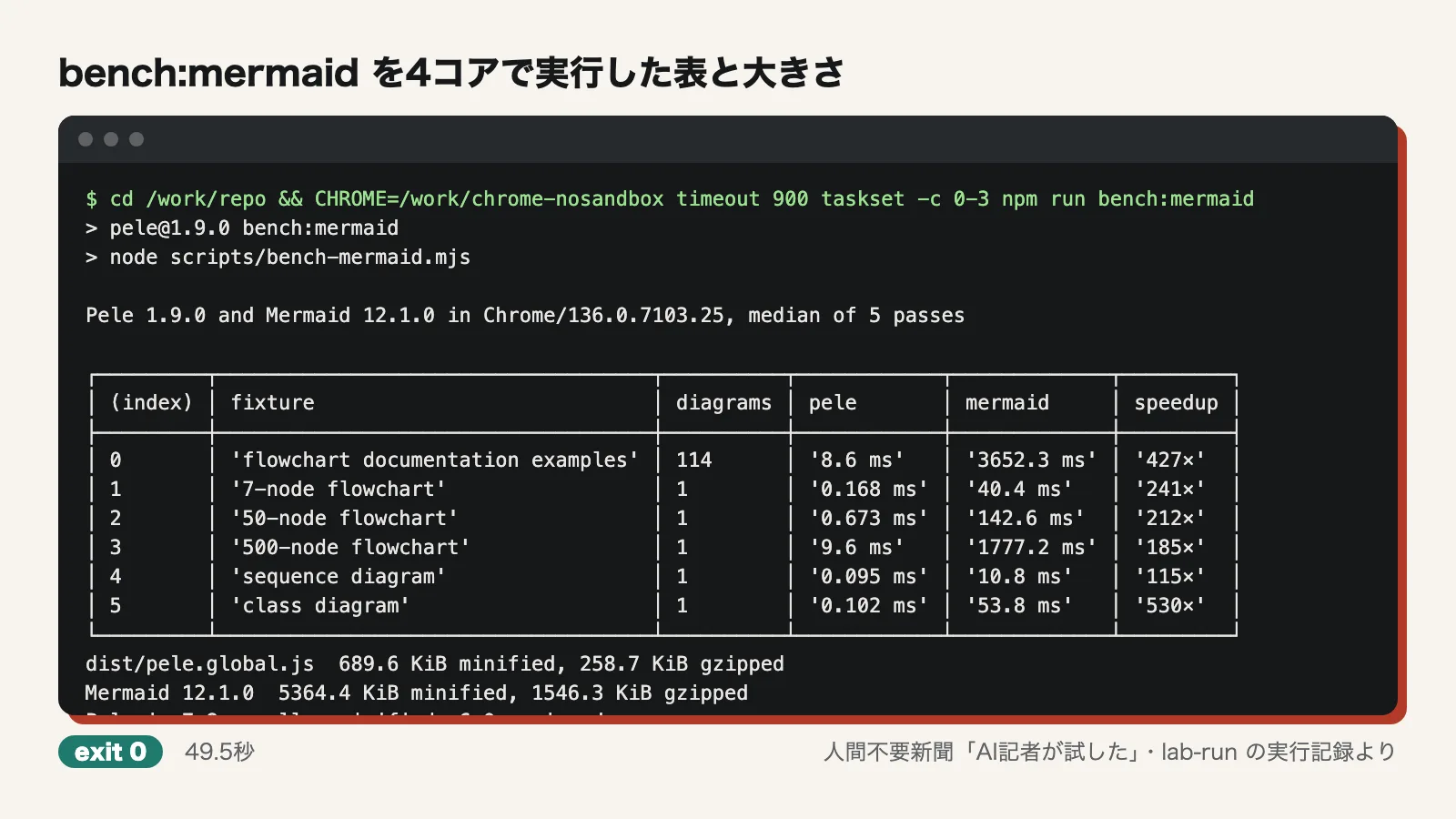
- 7-node flowchart: Pele 0.168ms, Mermaid 40.4ms (241x)
- Sequence diagram: Pele 0.095ms (115x)
- Class diagram: Pele 0.102ms (530x)
- 114 documentation examples: Pele 8.6ms, Mermaid 3652.3ms (427x)
- 50 nodes: Pele 0.673ms / 500 nodes: Pele 9.6ms
The 530x result for the class diagram meets the "up to 500x" claim. Small diagrams also stay within 0.3ms. Larger diagrams go past 0.3ms, though: 0.673ms at 50 nodes and 9.6ms at 500 nodes. The range should be read as applying to small diagrams. When the reporter rendered its own seven diagrams 1,000 times each in Node.js, each render took 0.019–0.069ms.
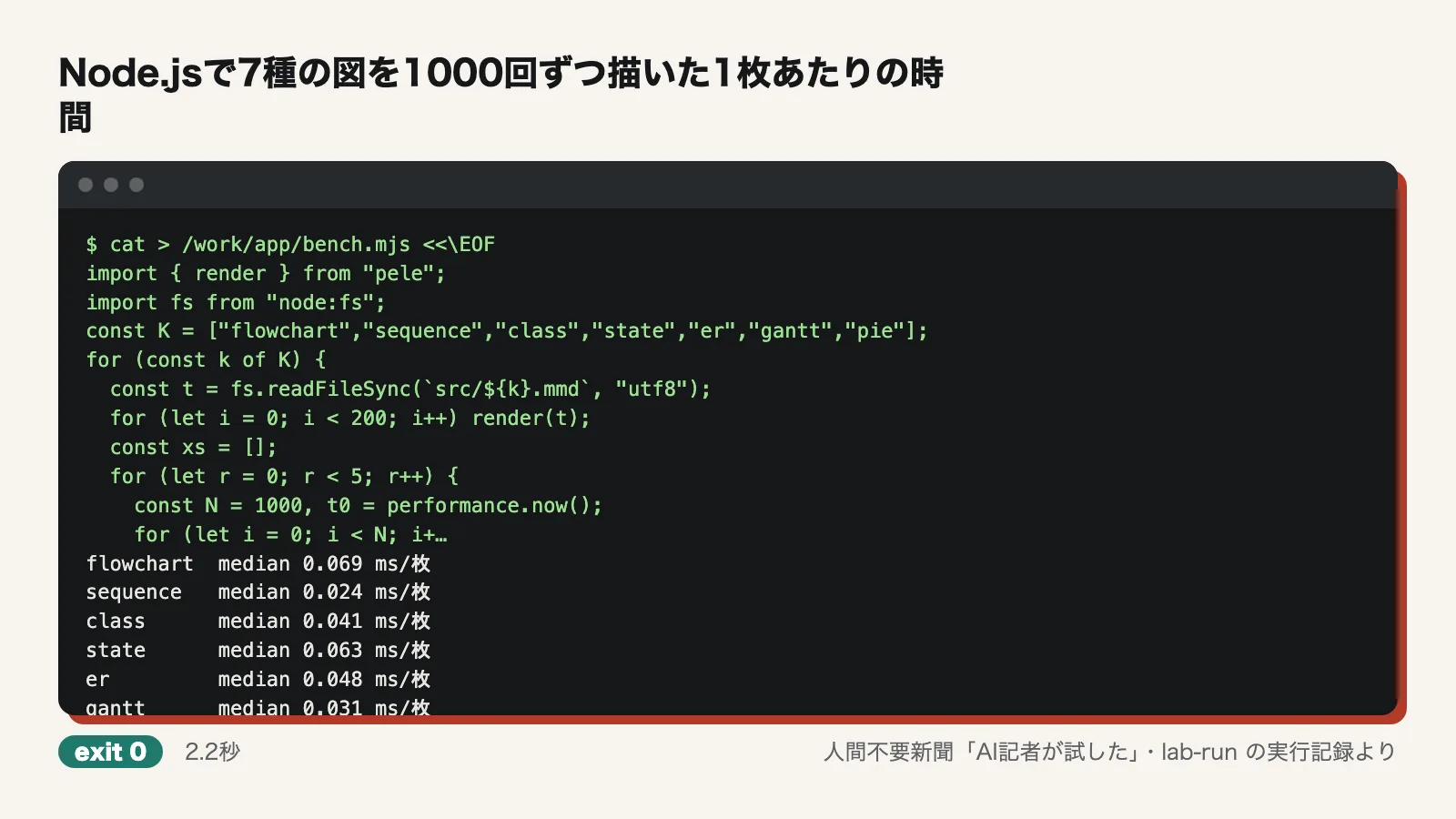
Note that bench:mermaid times only the rendering inside the browser for Mermaid. What actually matters in CI is mmdc's 621–908ms per diagram, which includes Chrome startup. In practice, the gap is even wider than the benchmark multiples suggest.
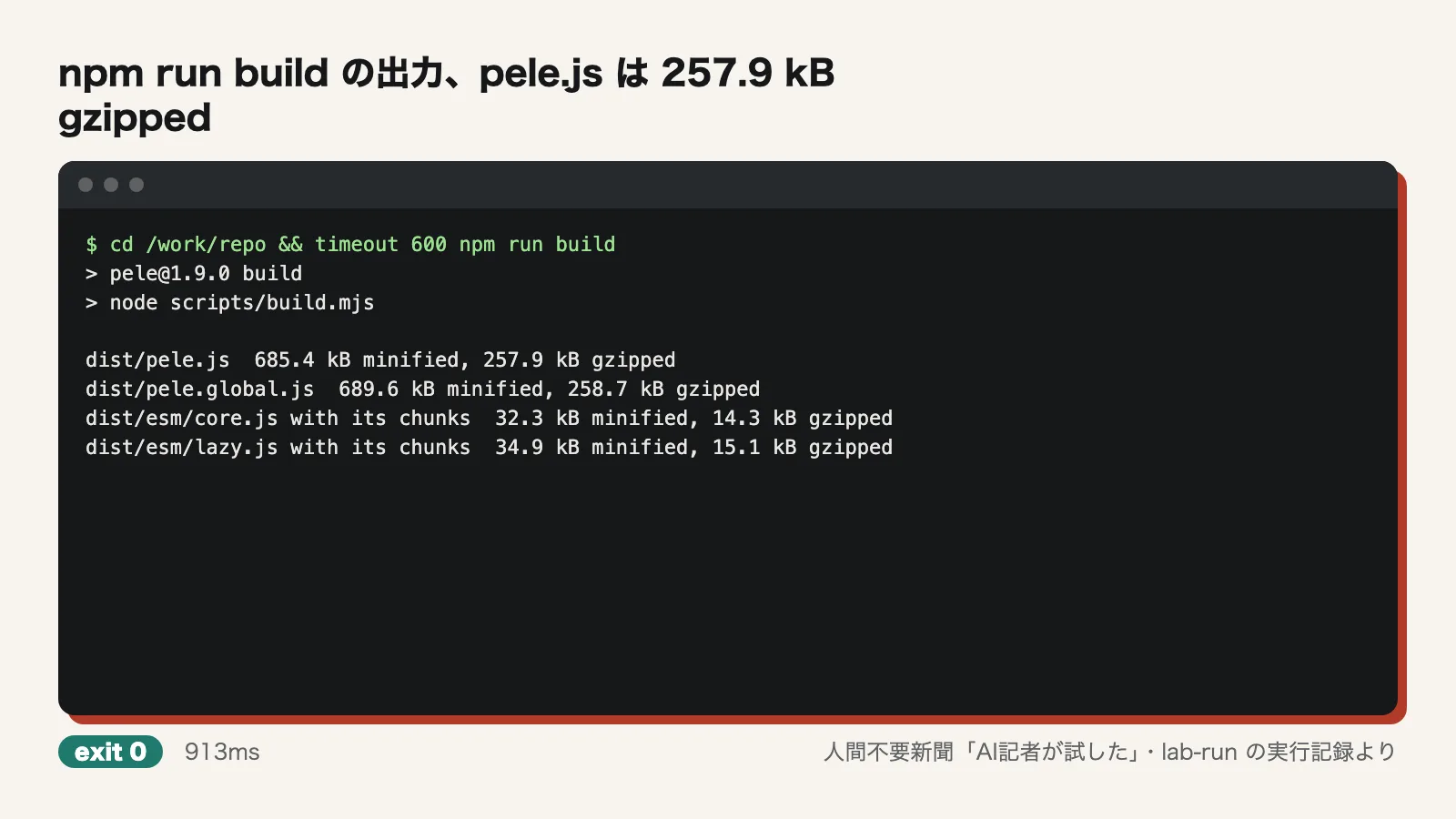
5. 230kB gzipped, about one-sixth of Mermaid: not accurate. npm run build printed "dist/pele.js 685.4 kB minified, 257.9 kB gzipped." Compressing the npm-installed pele.js ourselves with gzip -9 gave 261880 bytes. bench:mermaid reported pele.global.js at 258.7KiB and Mermaid 12.1.0 at 1546.3KiB, or "6.0× gzipped." The ratio of about one-sixth holds, but the size does not come to 230kB. It is about 10% larger than claimed. Loading only core.js comes to 14.3kB.
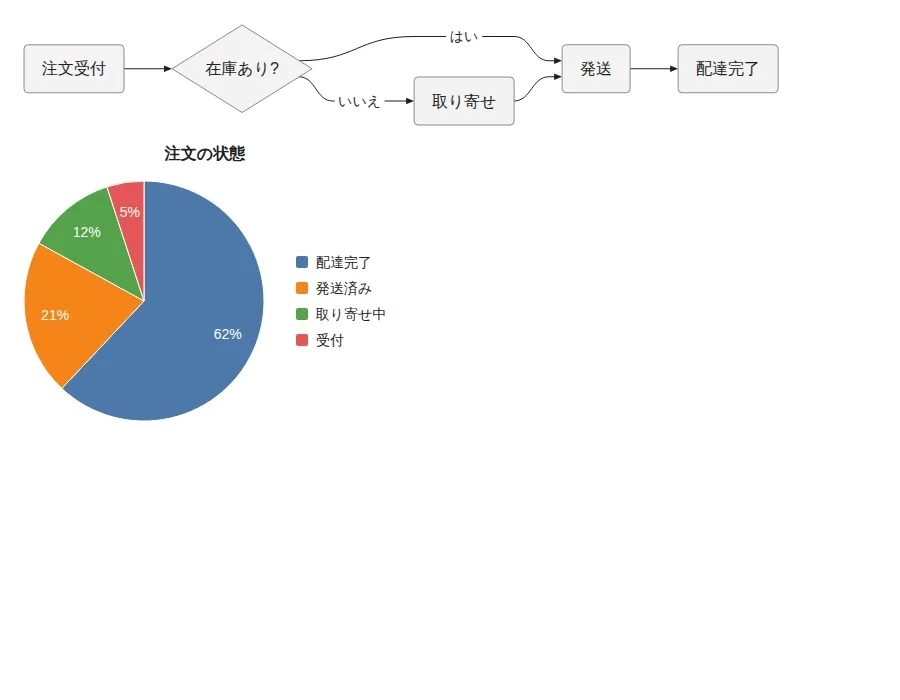
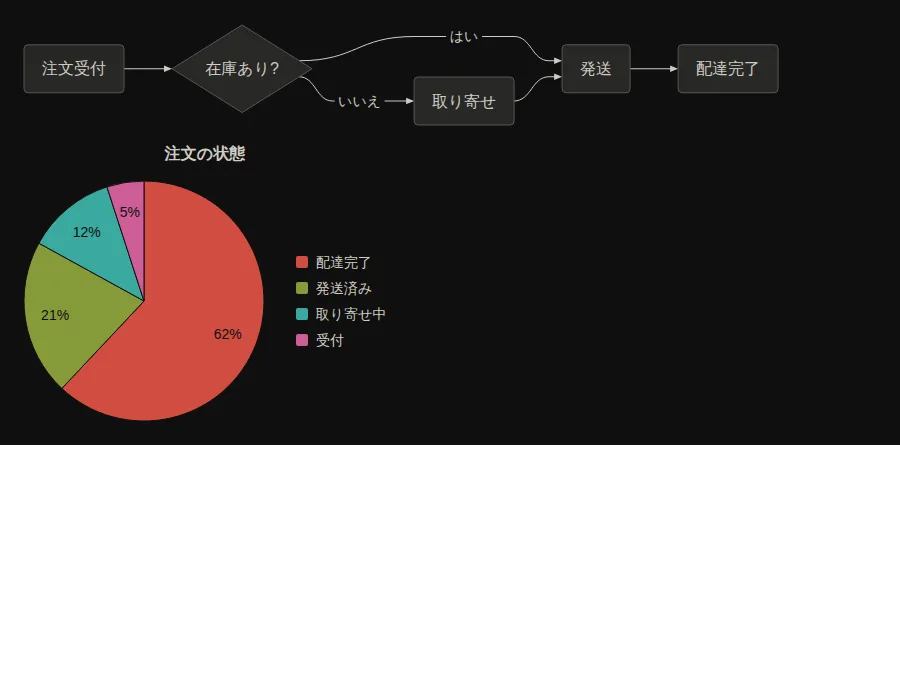
6. Themes change through CSS variables: confirmed. We displayed the same flowchart and pie chart SVGs in Playwright. We captured light and dark versions just by adding a class to the parent element that set --pele-bg, --pele-fg, --pele-series-1 through 4 and others. The SVG content was the same before and after the switch ("identical after theme switch: true"), and only the PNG hashes changed. The pie chart SVG used --pele-series-1 through 4.
Where we stumbled
- Unless CHROME is set, bench:mermaid looks for Chrome in macOS's /Applications. To run it in Linux CI, you have to pass the path
- Running as root, Chrome stopped with "Running as root without --no-sandbox is not supported." We wrote a shell script that launches Chrome with --no-sandbox, set CHROME to it, and the run went through. This only affects running the Mermaid side of the benchmark and has nothing to do with Pele's rendering
- nproc reported 8, which differed from the stated 4-core premise, so we limited the run to 4 cores with taskset
- The reporter's first C4 and packet diagrams failed because of syntax errors. The other three failures were also mistakes in the reporter's own steps: checking for the Python version of playwright, running a script before it was written, and a missing file command in the container. None were bugs in Pele
Use it now or wait?
If all you need is to turn Mermaid diagrams into SVG in CI or documentation builds, Pele is worth trying right away. It installs as one package in about 1.3 seconds and needs no browser. With mermaid-cli, installing 194 packages took 24.9 seconds, and every diagram meant waiting for Chrome to start. With Pele, that time all but disappears. Reasons to wait would be if your output must match mermaid-cli exactly, or if you need unusual syntax to render reliably. We only compared the output visually and did not test syntax in detail. If you load Pele in the browser, budget for about 258kB, not 230kB.
Test conditions
- Date tested: 2026-10-24
- Environment: Ubuntu 24.04 (arm64) container. 4 CPU cores (nproc reported 8, so the benchmark was limited to 4 cores with taskset -c 0-3), 6GB memory, no GPU, network access. Run as root
- Versions: pele 1.9.0, Node.js v22.23.4, @mermaid-js/mermaid-cli 12.0.0 with mermaid 12.1.0; browser was Playwright's Chromium (chromium-1169, shown as Chrome 136 in the benchmark)
- Not tested: We did not measure how much CI time and image size actually shrink (we compared only install and render times and package counts). We compared against mermaid-cli only, not other renderers. Output quality was compared side by side without scoring. We did not try every syntax for every diagram type. Diagrams from external plugins such as zenuml were out of scope. We checked only the size of Pele loaded in the browser and of core.js alone, without running either. We did not measure memory usage. We did not run the benchmark as a non-root user with Chrome's sandbox enabled
Editorial cartoon