Infrastructure & Security · Oct 19, 2026
19 lookalike npm packages target the settings of AI coding tools
In part 2 of our series "How leaks happen, and how to defend against them now," we look at three incidents that got in through AI coding assistants and npm, and list what to do today on developer machines and in CI.
Seiichi Tanaka · Editor-in-Chief

Key points
- Tampered axios versions 1.14.1 and 0.30.4 were live for about three hours on March 31, 2026. Search lockfiles for these two versions and for plain-crypto-js. If you find any, rebuild the affected machine and rotate every key on it
- Socket found at least 19 npm packages with lookalike names, three of them posing as Claude Code. Delete any entry under mcpServers in your AI assistants' settings that you don't recognize
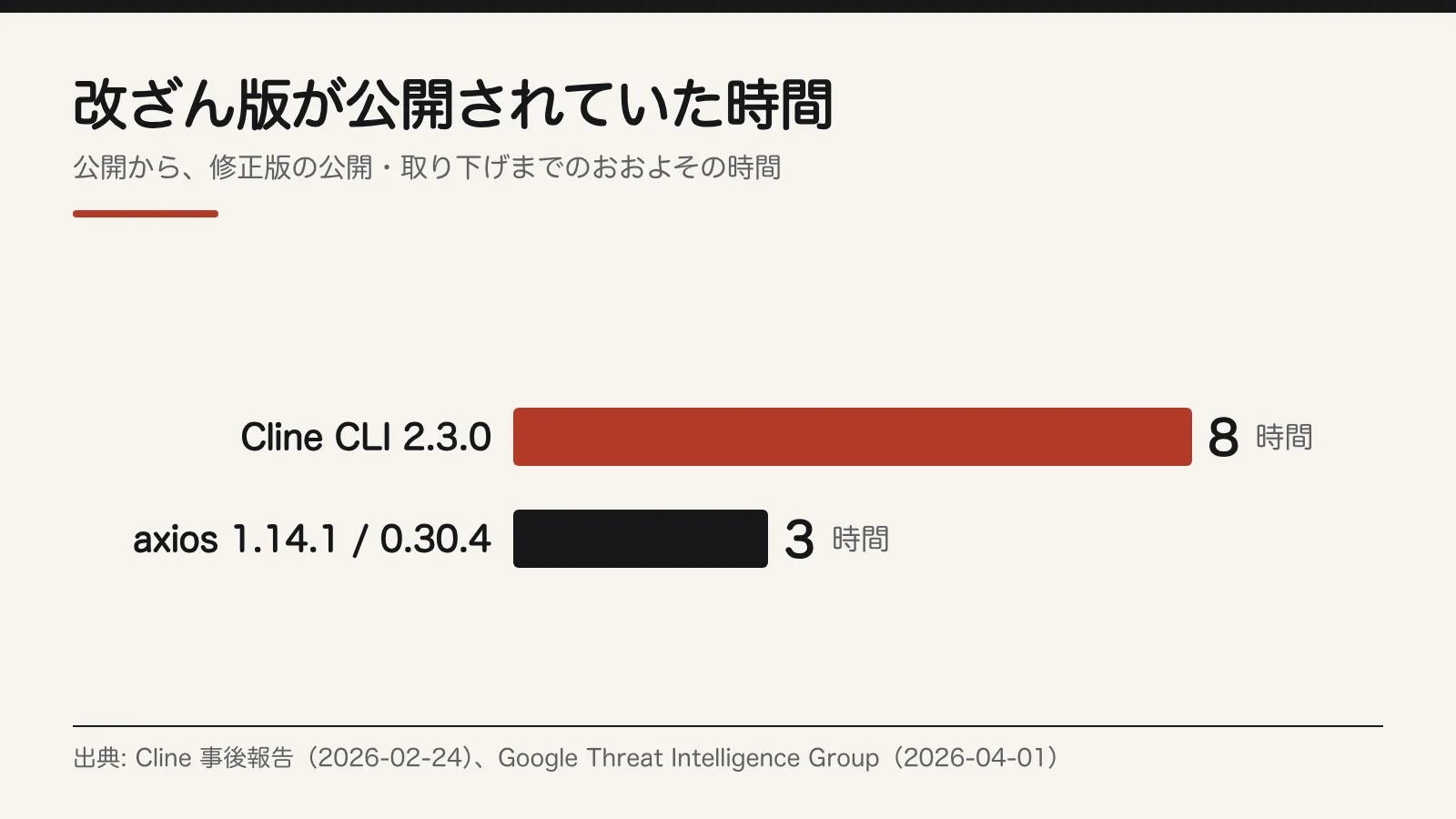
- Cline gave shell access to an AI that anyone could trigger by opening an issue, and cline@2.3.0 was published without authorization and stayed up for about eight hours. Make AI agents in CI read-only, with no shell
- Move npm publishing from long-lived tokens to GitHub Actions OIDC (trusted publishing). After rotating keys, test that the old keys really no longer work
Since the start of 2026, there have been three incidents involving AI coding assistants and npm, the main registry for JavaScript packages. An unauthorized Cline npm package stayed up for about eight hours. A tampered axios was live for about three hours. And at least 19 packages with names copied from Claude Code and other tools were spread around.
In all three, the attackers went after the "settings" and "permissions" of tools developers use every day. This article briefly covers what happened in each case. It then lists what can be done starting today, for every organization, on developer machines and in CI (continuous integration), and ends with what to do if you have already installed one of these packages.
What happened in the three incidents
Cline: an AI that reads issues had shell access
On December 21, 2025, Cline added an automated workflow that had AI sort its GitHub issues. Anyone could start the workflow just by opening an issue, and it gave the AI shell (command execution) access. It ran claude-code-action with allowed_non_write_users set to "*" and the Bash tool turned on.
That meant instructions hidden in an issue's text (prompt injection) could make the AI run any command. The workflow also shared a cache with the nightly release workflow, which opened a path to the release secrets, Cline explained in its post-mortem.
Researcher Adnan Khan reported the issue privately on January 1, 2026, and it was made public on February 9. Cline removed the vulnerable workflow within 30 minutes and began rotating keys. But the leaked token did not appear in the admin dashboard's list, and rotating the npm token failed.
We failed to rotate the NPM token: during the process, the wrong token was deleted while the exposed one remained active.
Cline, post-mortem on the unauthorized npm package release
At 03:26 Pacific Time on February 17, 2026, someone used that still-valid token to publish cline@2.3.0 without authorization. The only change was one line that quietly installed another piece of software (openclaw) when the package was installed. Version 2.4.0 came out at 11:23 the same day, and 2.3.0 was deprecated (GHSA-9ppg-jx86-fqw7).
Cline says the malicious code reached no one. The VS Code and JetBrains extensions were not affected. One estimate puts downloads during that window at about 4,000 (a StepSecurity estimate reported by The Hacker News, not a confirmed first-hand figure).
axios: a maintainer's account was taken over
For about three hours on March 31, 2026, from 00:21 to 03:20 UTC, attackers controlled a maintainer account for axios, a widely used HTTP library, and published tampered versions 1.14.1 and 0.30.4. The account's contact email had been changed to an address the attacker controlled. How the account was taken over has not been disclosed.
The axios code itself was not changed. The attackers only added one dependency, plain-crypto-js. It runs when the package is installed and drops a backdoor (WAVESHAPER.V2) for Windows, macOS and Linux. Google Threat Intelligence Group is tracking it as activity by UNC1069, a group linked to North Korea.
The chart below shows how long the tampered Cline and axios versions were available.
SANDWORM_MODE: lookalike packages rewrite AI settings
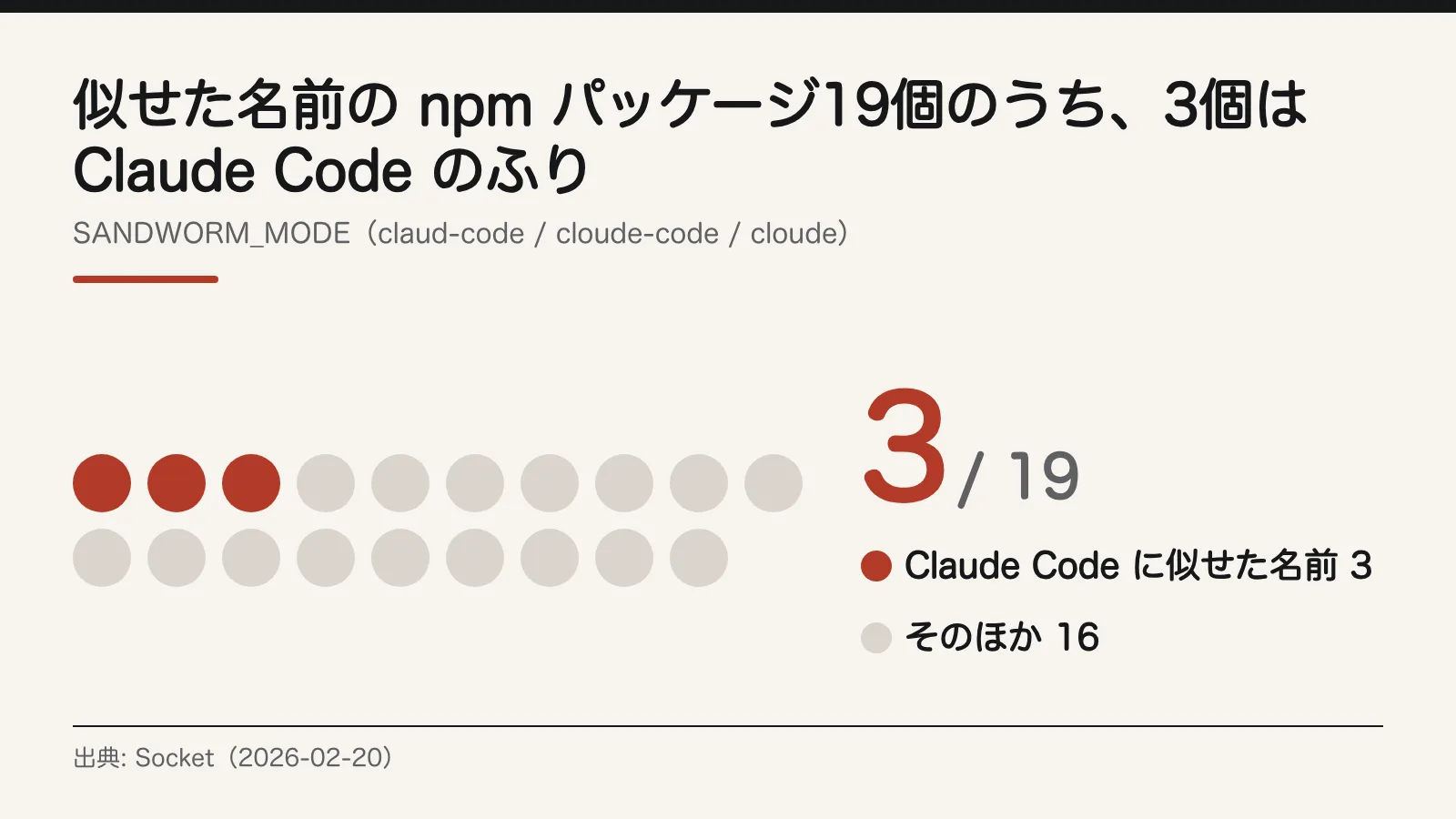
According to research by Socket (February 20, 2026), at least 19 typosquatted npm packages, named to look like real ones, were published from two accounts. claud-code, cloude-code and cloude imitate Claude Code, and suport-color imitates the real supports-color.
Three of the 19 posed as Claude Code.
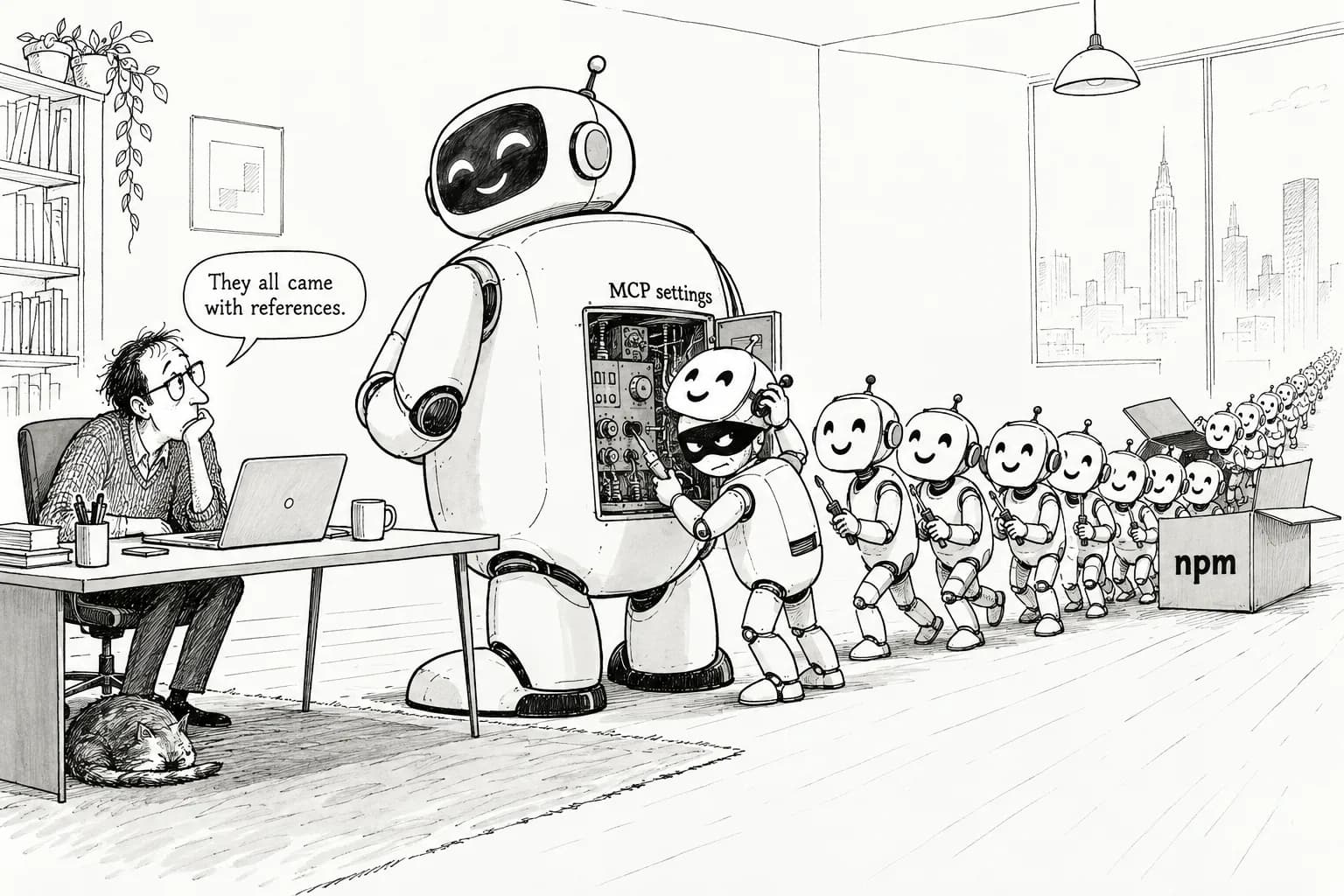
Once installed, the packages first collect a wide range of credentials, including tokens, keys and API keys (the full list is in "If you've already installed one" below). They then add fake MCP servers to the settings of Claude Code, Claude Desktop, Cursor, Continue for VS Code and Windsurf, and use instructions hidden in those tools' descriptions to try to get the AI to collect sensitive files.
They also try to spread on their own: republishing other packages with stolen npm tokens, adding dependencies to GitHub repositories, and using git's global init.templateDir so they carry over into new repositories. In CI, they run right away with no delay. The packages have since been removed from the registry.
What every organization should do today: look for the tampered versions and lookalike names
Any organization that uses npm should start here, whether or not it uses AI tools. Google's report tells users plainly not to upgrade to the tampered versions.
Do not upgrade to axios version 1.14.1 or 0.30.4.
Google Threat Intelligence Group, report on a North Korea-linked group targeting the axios npm package
- Today, search the lockfiles (package-lock.json and the like) in every company repository for axios 1.14.1 and 0.30.4, and for the name plain-crypto-js.
- In the same search, look for claud-code, cloude-code, cloude and suport-color.
- Safe versions are 1.14.0 and earlier, and 0.30.3 and earlier. Check that your lockfiles pin axios within this range.
- If you find even one match, assume that machine or CI runner is compromised. Rebuild it and rotate every key it held.
- Clear your npm, yarn and pnpm caches as well.
Also change two things about how you pull dependencies.
- Pin versions in lockfiles, and don't have CI fetch "latest."
- Set up an internal npm mirror or proxy that serves only vetted versions (a Google recommendation).
What to do on developer machines today
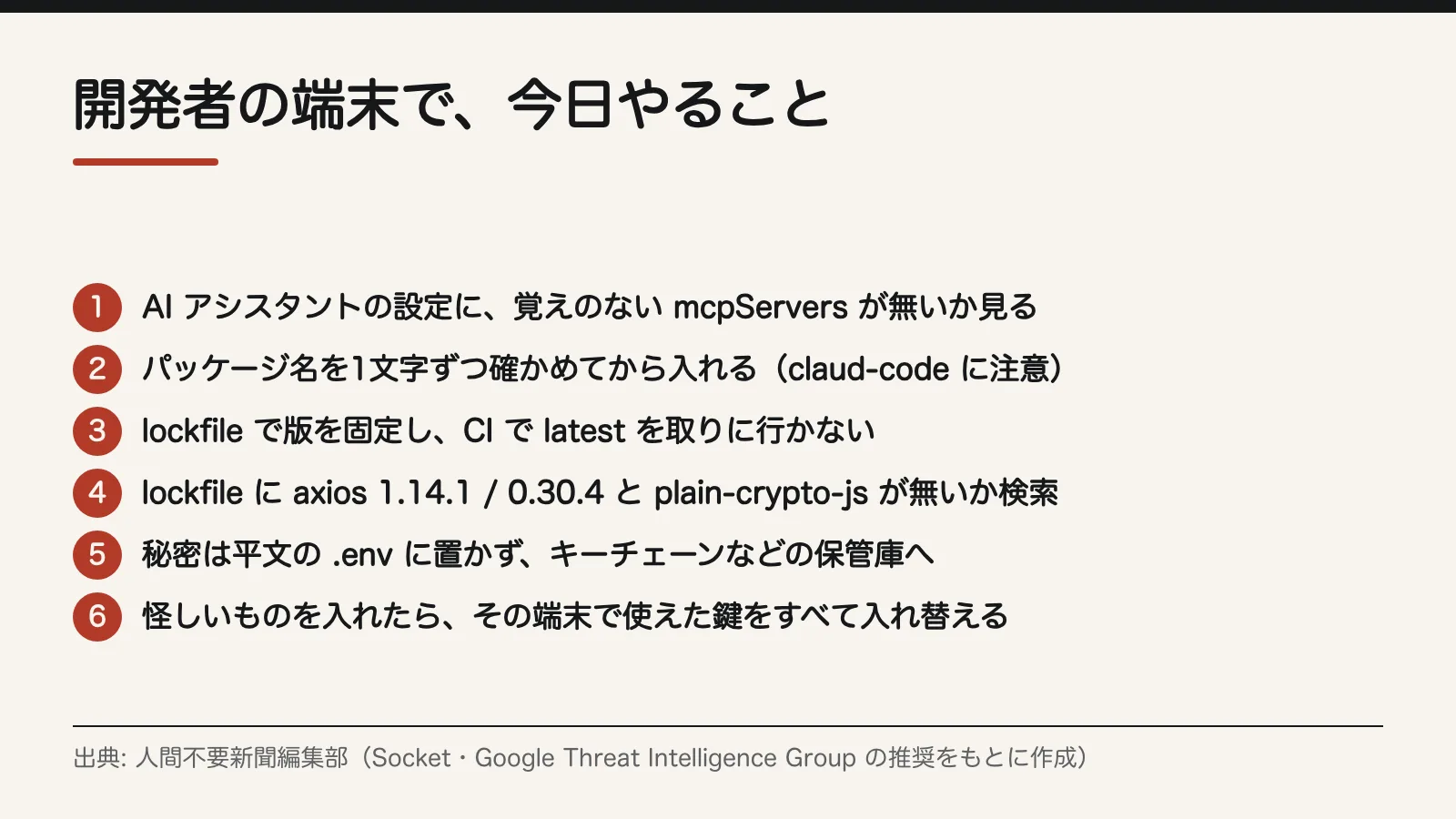
Figure 4 sums up what to check on developer machines. Have each developer work through the following.
- Open your MCP settings. In the settings files for Claude Code, Claude Desktop, Cursor, Windsurf and VS Code (including Continue), look at the mcpServers entries and delete any you don't remember adding.
- Check your git template setting. Run git config --global init.templateDir and remove any settings or hooks you don't recognize.
- Check package names letter by letter before installing. Lookalike names such as claud-code, cloude-code, cloude and suport-color exist.
- Check names when AI installs packages too. When you ask an AI to install a package and it suggests a name, compare it letter by letter with the real name before installing.
- Don't keep secrets in plain text. Move API keys and tokens sitting in .env files or environment variables into a secure store such as your OS keychain (Google recommends this too).
If IT is only part of your job, you can hand this list straight to your developers and have them report back when each machine is done. Ask everyone to check the two items on MCP settings and init.templateDir, even people who don't remember installing anything.
If you run AI agents in CI
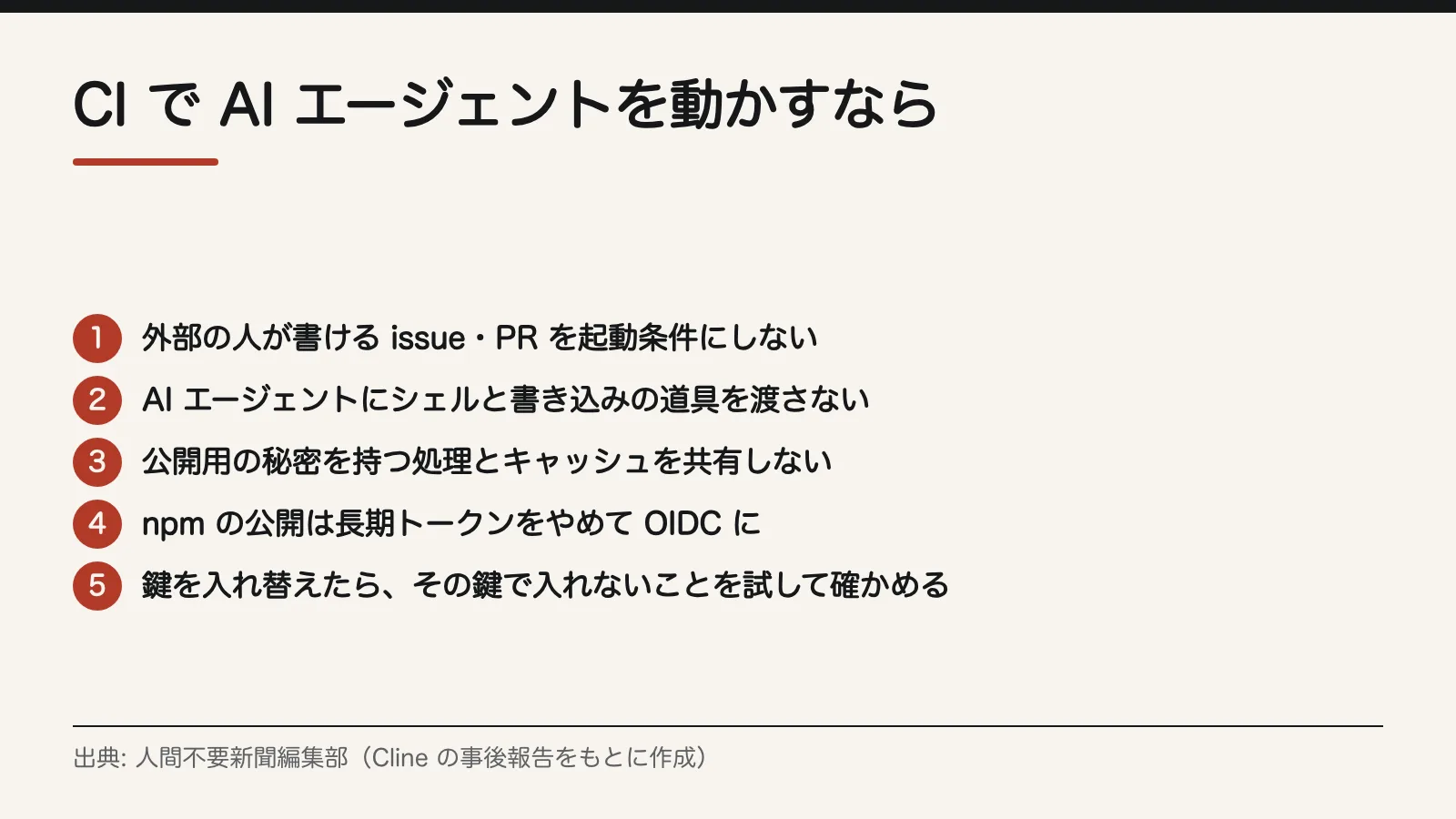
Figure 3 lists CI settings that close the gaps that broke open in the Cline case. Organizations that have AI respond to issues or PRs in GitHub Actions should open their workflow files and go through them from the top.
- Don't trigger on text that outsiders can write. Look for settings that start an AI agent from an issue or PR title, body or comment. If you keep them, limit them to people with write access. With claude-code-action, leave allowed_non_write_users empty.
- Don't give the agent shell or write tools. Sorting and summarizing need only read access. Cline also switched its future automation to read-only with no shell.
- Keep workflows that hold release secrets on a separate cache. Check whether workflows that handle secrets, such as publishing to npm, share a cache with other workflows. Cline removed the GitHub Actions cache from its release workflows.
- Move npm publishing from long-lived tokens to OIDC. With GitHub Actions trusted publishing (provenance), there is no longer a long-lived token to be stolen in the first place.
- After rotating keys, test that the old keys really no longer work. Seeing a key vanish from the admin dashboard's list is not enough. Cline missed a token that didn't show up in the list.
If you publish packages yourself, turn on multi-factor authentication for every maintainer's npm account and publish through OIDC. In the axios case, the way in was a maintainer's account.
If you've already installed one: limiting the damage
If you find you had a lookalike package or a tampered axios version installed, removing the package is not enough. Socket says the whole environment where it ran should be treated as exposed.
Treat any environment where they ran (developer workstation or CI) as potentially exposed
Socket, SANDWORM_MODE research report
- Delete node_modules/. If it was a tampered axios version, rebuild the machine.
- Rotate every npm and GitHub token, and every CI secret, that was usable on that machine and in CI (a Socket recommendation).
- Add what SANDWORM_MODE collects to your rotation list: .npmrc, SSH keys, AWS credentials, values in .env files, environment variables containing key, secret, token or password, LLM API keys (nine providers are targeted), and the contents of password managers readable from the CLI.
- After rotating, test each old key one by one to confirm you can't actually log in or publish with it.
- Check MCP settings and init.templateDir again, following the steps for developer machines. Lookalike packages try to stay hidden there.
- Check the packages you publish and your GitHub repositories for versions or added dependencies you don't recognize. Stolen tokens may have been used to republish them.
Sources
Editorial cartoon
Sources
- https://cline.bot/blog/post-mortem-unauthorized-cline-cli-npm
- https://github.com/cline/cline/security/advisories/GHSA-9ppg-jx86-fqw7
- https://socket.dev/blog/sandworm-mode-npm-worm-ai-toolchain-poisoning
- https://cloud.google.com/blog/topics/threat-intelligence/north-korea-threat-actor-targets-axios-npm-package