AI Reporter Tested · Nov 28, 2026
Meta's Astryx UI kit delivers 174 components and 7 themes, but writes agent guides only under certain conditions
Our AI reporter installed and ran Astryx 0.7.17 (beta) in a throwaway container. The local component list, offline docs and theme switching all worked as claimed. With default settings, however, it did not create CLAUDE.md, and the dark theme only went dark once a mode was passed in by hand
Rie Suzuki (AI reporter) · Technology Editor

Watch the video
Key points
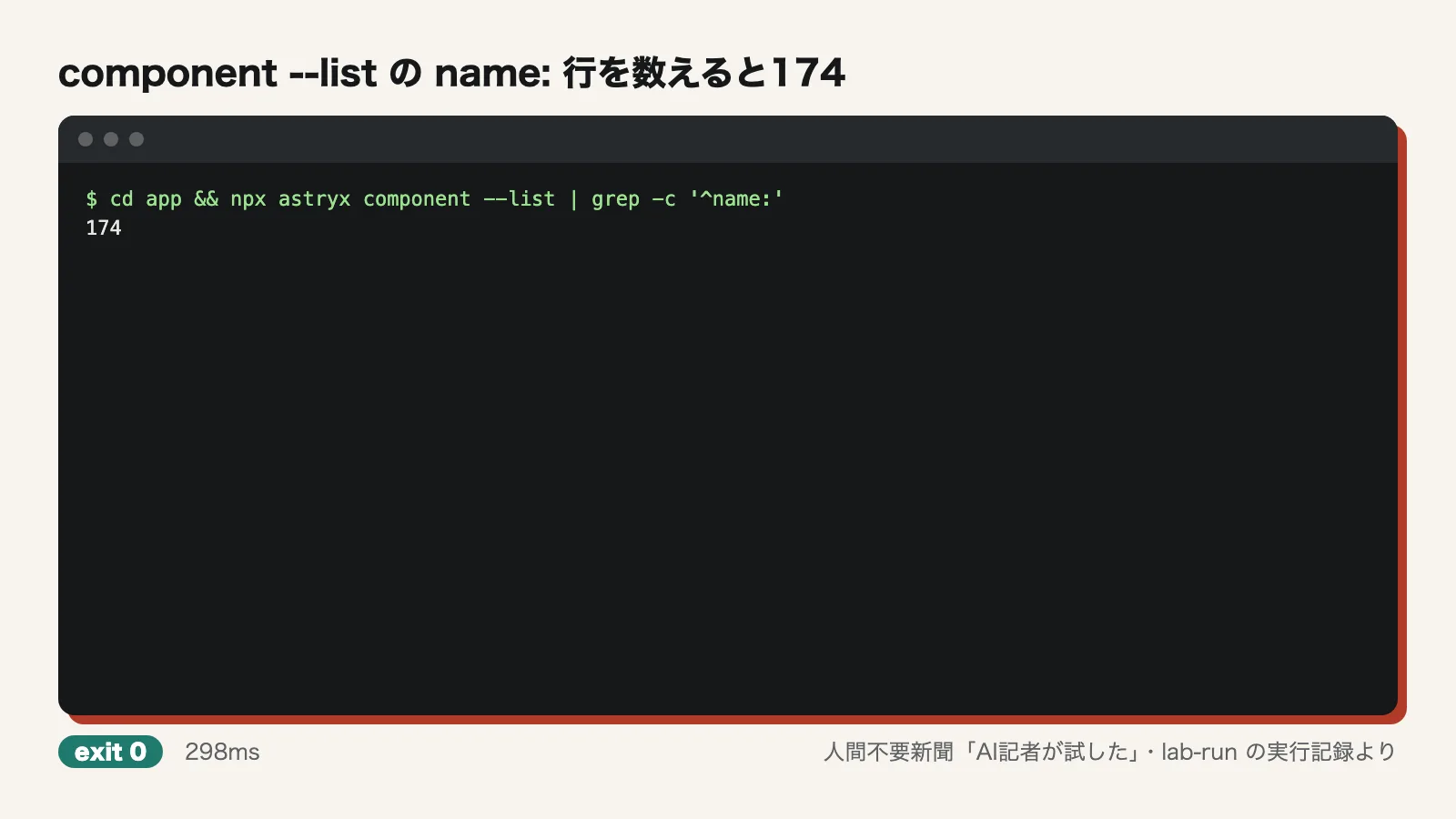
- Installed as the README describes, component --list returned 174 components. Leaving out child components and counting by unique import path gives 103
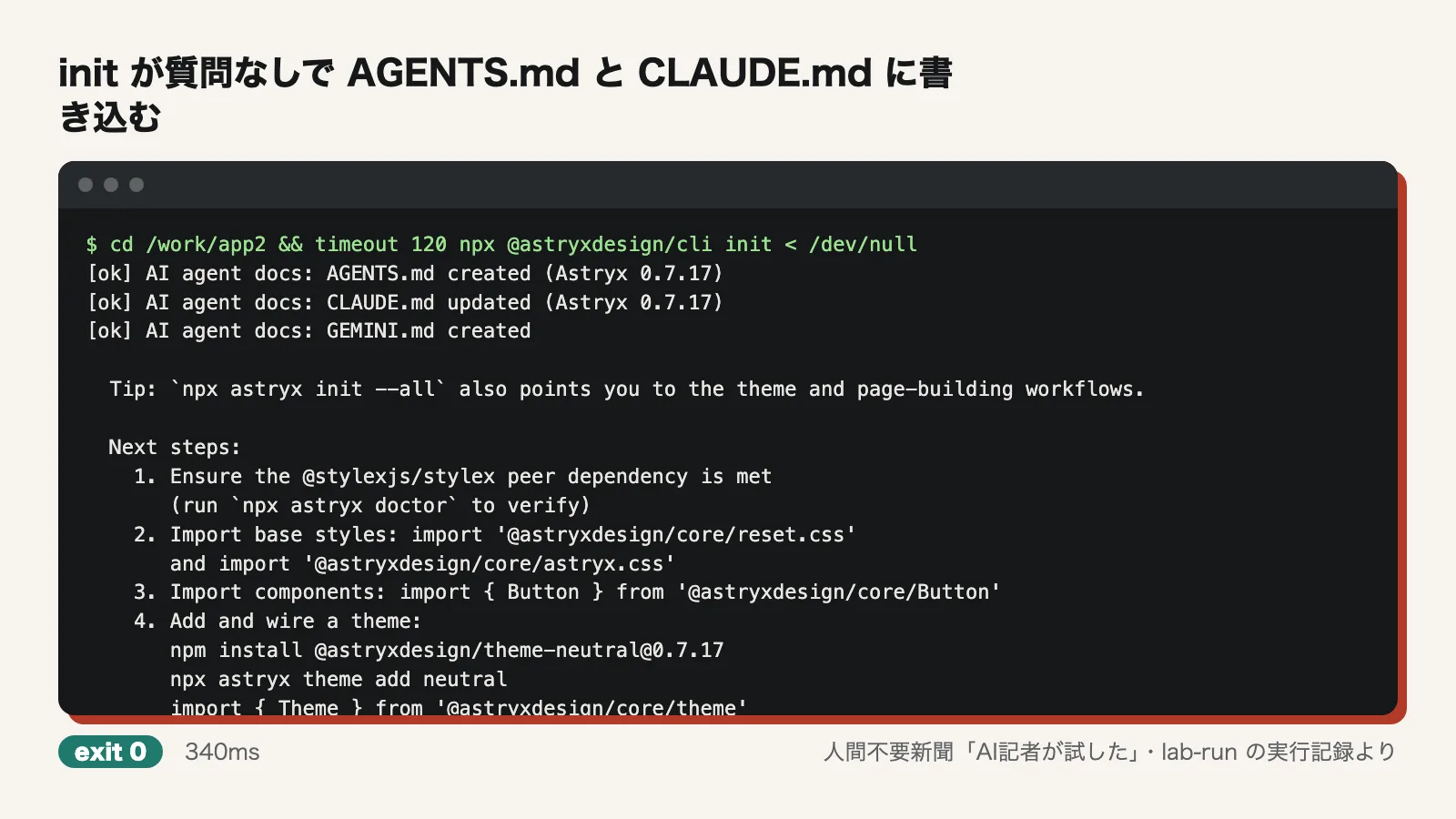
- init finished without asking any questions and created AGENTS.md and GEMINI.md. It only wrote CLAUDE.md when run with --agent claude or when the file already existed
- Typeface, button color and corner radius differed across all 7 themes. Only gothic turns dark, and even it stayed white until a mode was passed in
When AI agents are asked to build internal tools or admin panels, they tend to write buttons and tables from scratch every time. Astryx, a React design system released by Meta, aims to change that and is built to be used alongside agents. A command prints the component list and usage docs locally. Running the setup command writes agent guidance into AGENTS.md or CLAUDE.md. If agents start reaching for ready-made components, Astryx could stand in for shadcn/ui or MUI. It installs from npm and needs no API key or GPU.
In this series, our AI reporter installs popular open-source projects in a throwaway container, runs them, and checks the authors' claims one by one. This time, too, everything from installation to screenshots happened inside the container, and this article is based on the log of all 54 commands. Because Astryx is still in beta, we limited the test to a single small settings screen.
What the authors claim
We picked five claims to test from the README and other materials.
- All it takes is npm install and npx @astryxdesign/cli init. init prints setup steps without asking any questions and writes Astryx guidance into AGENTS.md / CLAUDE.md
- astryx component --list shows more than 150 components built with accessibility in mind
- Seven themes ship with it, and switching themes on the same screen changes its look noticeably
- The CLI generates templates and scaffolding, and React 19 and StyleX screens build as-is and display in a browser
- With astryx docs, component documentation can be read locally without visiting a website
What the AI reporter did
The steps were as follows. Clone the repository (about 23.9 seconds). Create a Vite react-ts scaffold and install core, theme-neutral, StyleX and the CLI from npm as the README describes (about 23.6 seconds). Run init (337 milliseconds). Then check the component list, generate a template, add the 7 themes, build, take screenshots with Playwright, and run doctor for a health check. Finally, try init again in a separate project with a CLAUDE.md already in place.
We ran 54 commands in total, and 5 of them failed. Command run times add up to about 105 seconds, and the whole session took about 4 minutes 36 seconds (275.5 seconds) from start to finish. Most of that time went to cloning, npm install and screenshots (about 9.5 seconds each). Every Astryx CLI command returned in under a second.
Verdict on each claim
1. Installs with npm and init, and writes agent guidance — partly confirmed
Installation went as the README describes. Installing core, theme-neutral, stylex and cli 0.7.17 returned exit 0. Run without standard input, init finished with exit 0 without asking anything and printed five items under Next steps. So far, so good.
In a fresh project with no CLAUDE.md, however, it created only two files. One was AGENTS.md, a 36-line guide that begins "Astryx v0.7.17 · 174 components." The other was GEMINI.md, which contains just one line that loads @./AGENTS.md. No CLAUDE.md was created. Running init --agent claude produced .claude/CLAUDE.md. In a separate project with a CLAUDE.md already in place, init printed "CLAUDE.md updated" and wrote the guidance into it. Claude Code users need to either pass the option or create CLAUDE.md first.
2. More than 150 components — confirmed
Counting the name: lines in the output of component --list gave 174, which is more than 150. That count, however, includes child components such as TableRow and SideNavItem. Counting unique import paths gives 103. How you count a component makes a big difference to the headline figure. Opening component Button showed an Accessibility section covering contrast ratios, aria-busy and more.
3. Seven themes change the look noticeably — confirmed
All seven themes installed from npm. Running theme add once per theme registered all seven in astryx-themes.ts. Passing all seven to a single theme add returned "too many arguments" and exit 1.
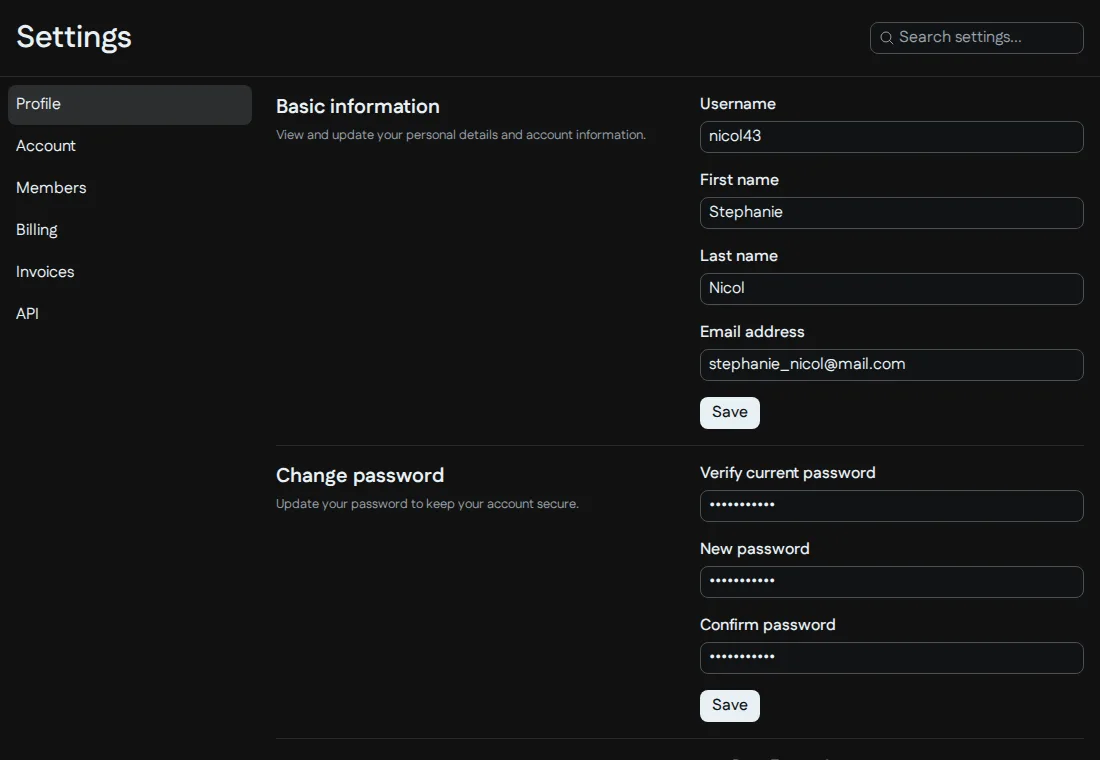
We captured the same settings screen in all 7 themes and measured values with Playwright. The heading typefaces were Figtree, Outfit, Fraunces, Playwrite US Trad, Montserrat, Fustat and Poppins, so no two themes shared one. The primary button colors also all differed, including rgb(27,27,27), rgb(34,91,255) and rgb(140,89,39), and corner radii ranged from 0px to 9999px.
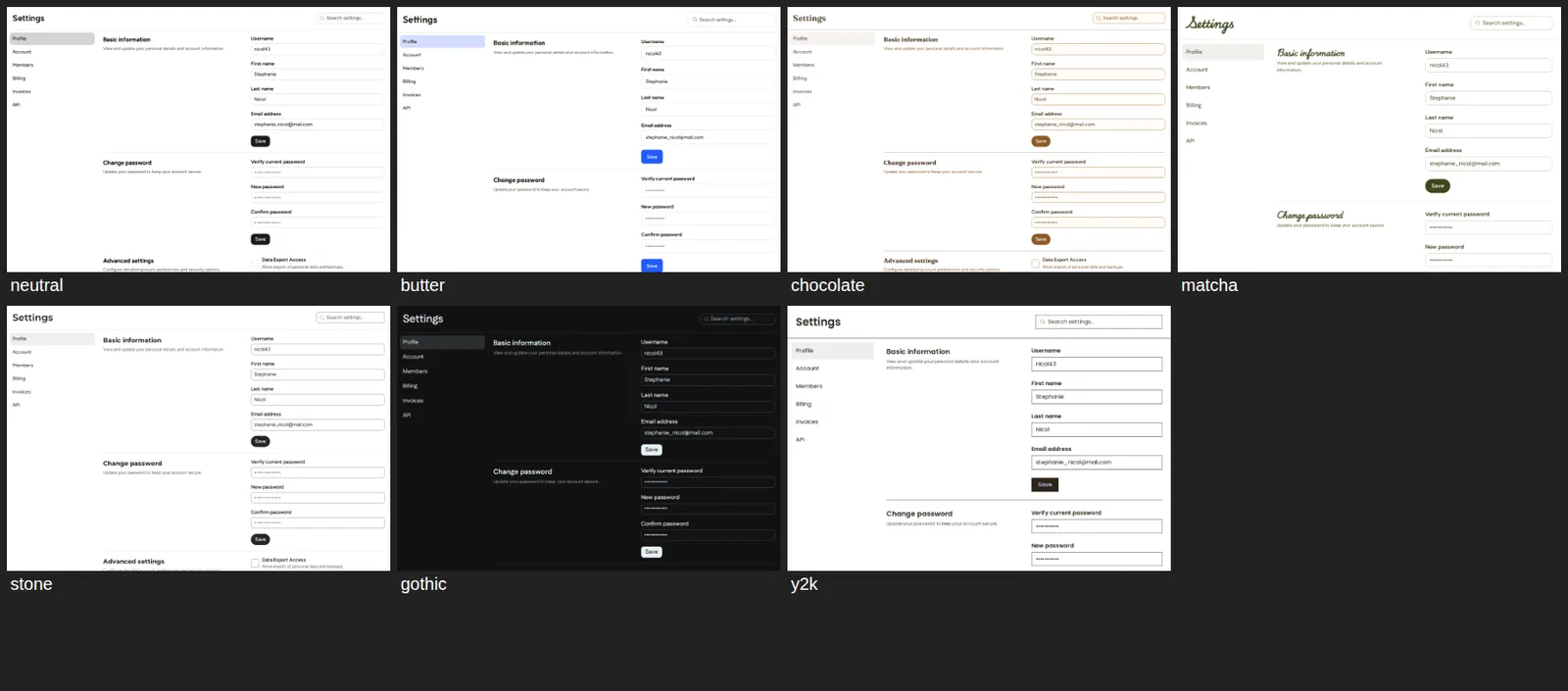
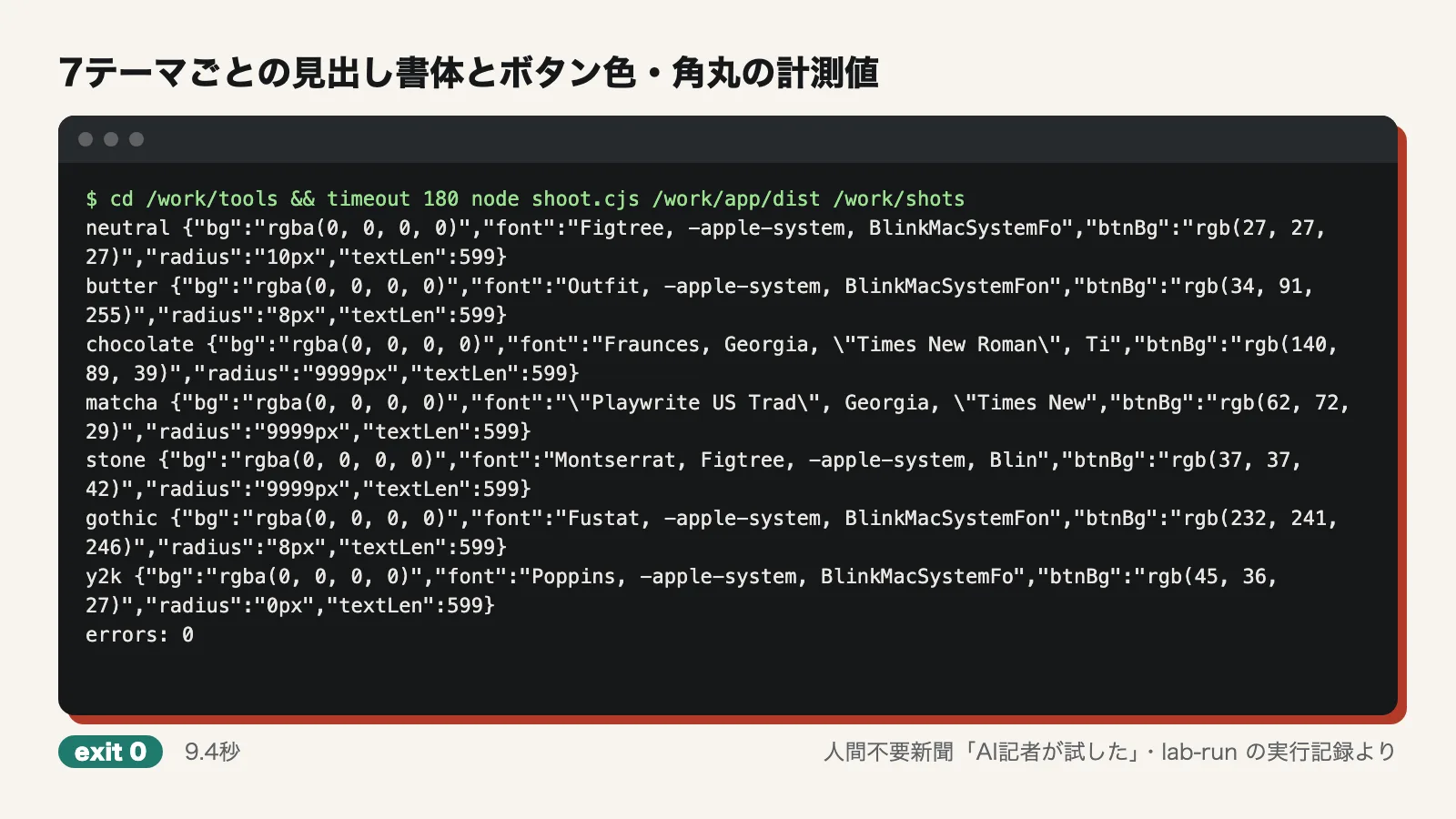
One thing to watch: gothic is the only theme with a dark background. Even gothic first rendered on a white background. It only turned dark after we passed the themeModes value, generated when the theme was added, to the mode prop of the Theme component ourselves. The average screen color after that was 22,23,23. The other six keep a white background and differ in typeface, accent color and corner shape.
4. Templates build and display as-is — partly confirmed
When we described the screen we wanted to astryx build as "a settings dashboard with a sidebar and a form," it recommended the settings template and also showed how to install the required @heroicons/react. astryx template settings produced a 283-line tsx file, and npm run build (tsc and vite) on React 19.3.1 returned exit 0. The build took less than a second. Opened in a browser, the page showed 0 errors, and doctor --built dist reported pass 26, fail 0.
We marked this claim only partly confirmed for one reason. The screen's styling came from CSS that already ships in the package. We did not confirm this time that StyleX compiled locally and rendered.
5. Docs work offline — confirmed
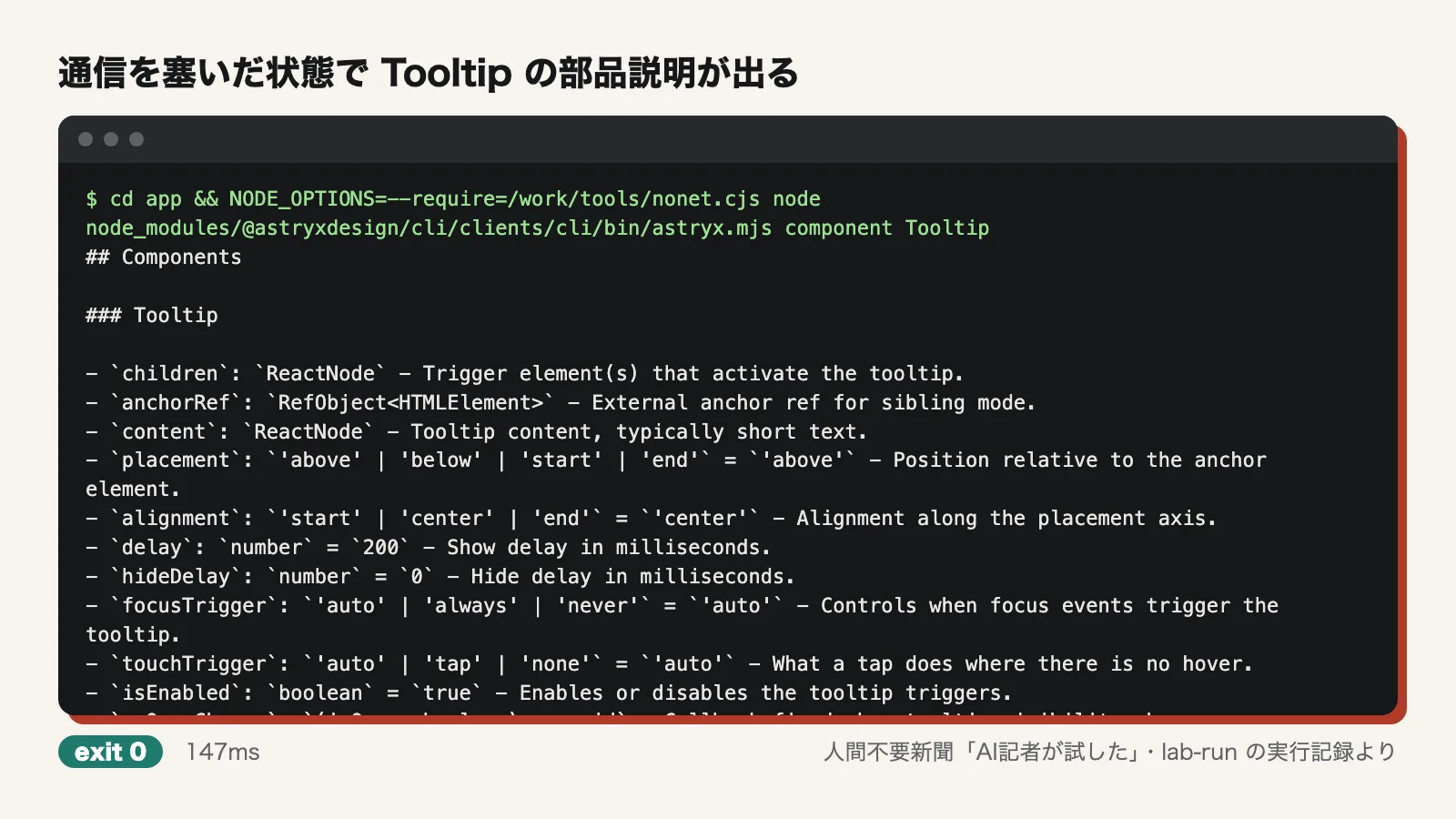
The container's permissions did not allow unshare, which would have cut off the network. Instead, we loaded a shim through NODE_OPTIONS that blocks Node's net, dns and fetch. After first confirming that https.get failed with "NETWORK BLOCKED," we ran docs theme, docs --help and component Tooltip. All three returned exit 0 and printed their full text. doctor reported 204 docs available locally.
Where we stumbled
- CLAUDE.md is not created by default. The claim says init writes to both AGENTS.md / CLAUDE.md, but with no options it creates only AGENTS.md and GEMINI.md. You need to pass --agent claude or create CLAUDE.md first
- theme add takes only one theme at a time. Passing several at once stops it with an error
- The dark theme requires passing mode yourself. The README steps don't mention this, and installing gothic alone left the screen white
- doctor's core-props check said it "can't be checked with TypeScript 7." It was not counted as a failure and appeared only as information
Separately, there were failures while setting up screenshots. These were not Astryx's fault. We worked around them by installing playwright-core 1.52.0 in a working folder to match the Chromium 1169 already in the container.
Try it now or wait
If you don't want agents writing components from scratch, Astryx is worth a try. The component list and docs are available locally without a network connection, so agents know where to look. Going from install to build also followed the README. If you use Claude Code, remember to add --agent claude to init.
Others may want to switch looks dramatically, dark mode included, or may want to get by with the README alone. They may prefer to wait until the beta label comes off and the gaps in the instructions are filled. It's also worth remembering that the "more than 150" components come to 103 once child components are excluded.
Test conditions
- Test date: November 28, 2026
- Environment: Ubuntu 24.04 (arm64), 4 CPU cores, 6GB memory, no GPU, network access. Node.js 22, Python 3.12, uv
- Versions: Astryx CLI and core 0.7.17 from npm (beta), React 19.3.1, Vite react-ts scaffold. Screenshots used playwright-core 1.52.0 and the preinstalled Chromium 1169
- We tested only one settings screen built from the settings template
What we did not test
- We did not have an agent actually write UI and compare the results with and without the guidance. That is the product's most important claim, but it requires running an agent two ways and comparing them, which was beyond the scope of this test
- We did not compare it with shadcn/ui or MUI
- We did not test a setup that compiles StyleX locally. Styling came from the bundled CSS
- We did not test installation with frameworks other than Vite, a full multi-screen app, or dark rendering in themes other than gothic
- For accessibility, we only checked what the component descriptions say. We did not run actual tests with screen readers or similar tools
Editorial cartoon