AI Reporter Tested · Oct 31, 2026
Testing Impeccable: it caught 3 of the 4 flaws we planted, but missed the small tap targets
Series "An AI Reporter Tried It": it ran from a single npx command with no API key, and the 62 rules, JSON output and exit code 2 matched the docs. Checking a URL took a browser setting and a workaround for running as root
Rie Suzuki · Technology Editor

Watch the video
Key points
- npx -y impeccable detect site/ reported 5 findings in about 2.8 seconds with no config and no key, then exited with code 2. Clean HTML exited 0 with no output, and a folder that doesn't exist exited 1
- It caught Inter, gradient text in a heading and 11px body text, but it did not flag 20px buttons and links. None of the 62 rules checks tap target size
- URL mode failed twice: it could not find Chrome, and the browser would not start as root because of the sandbox. A script that adds --no-sandbox got it working
Ask Claude Code or Cursor to build a screen and the result often looks familiar: Inter for every font, a purple-to-blue gradient on the headings, and small body text. Impeccable is a tool that tries to catch this "AI-made look" with a command before merge, so nobody has to eyeball it. It is a design skill written for agents to read, and it comes with a rule-based detector, npx impeccable detect.
ESLint and Prettier check how code is written. They don't check colors, fonts or text size, and that is exactly what detect looks at. It doesn't use an LLM, so it doesn't need an API key either. Its only output is terminal text and JSON, so you can verify it on your own machine as-is. For this installment of our series "An AI Reporter Tried It," an AI reporter installed it in a throwaway container and checked the author's claims one by one.
What the author says
Of the claims the author makes in the README and elsewhere, we tested these six:
- npx impeccable detect can scan a directory of HTML, CSS, JSX and similar files with no install step and no API key
- --list-rules prints a list of the rules (62, according to the README)
- It flags flaws such as Inter-only fonts, gradient text in headings, small body text and small tap targets
- Adding --json produces machine-readable JSON
- It exits with code 2 when it finds problems, so it can fail a CI run
- Pass it an https://… address and it can check a page after a browser renders it
We did not test how well the slash commands work when an agent fixes a UI with them (the improvements shown in the examples). That would mean running an LLM and comparing the results.
What the AI reporter did
The test ran in an Ubuntu 24.04 (arm64) container with no GPU. After cloning the repository (about 2.9 seconds) and reading the README's section on detect, the reporter built some HTML with four planted flaws: Inter as the only font, gradient text in a heading, 11px body text, and buttons and links 20px square (with 10px text inside). For comparison, a clean HTML file went into a separate folder.
The reporter then tried, in order: scanning a folder, listing the rules, JSON output, scanning a URL, passing a path that doesn't exist, and scanning JSX styled with Tailwind classes. That came to 27 commands in total, and 7 of them ended with a nonzero exit code. Four of those were the expected "2 because there were findings," so only three were real failures: two in URL mode and one where the reporter passed a missing folder on purpose. The commands took about 15.6 seconds to run in total, and the whole session took about 93 seconds from start to finish. The version tested was impeccable 4.8.0 from npm.
The claims, one by one
1. One npx command can scan a directory: confirmed
npx -y impeccable detect site/ finished in about 2.8 seconds with no config file and no key. It reported 5 findings and exited with code 2. Those 2.8 seconds likely include downloading the package. Later runs of --version, --list-rules and the clean-HTML check each finished in about 0.4 to 0.6 seconds.
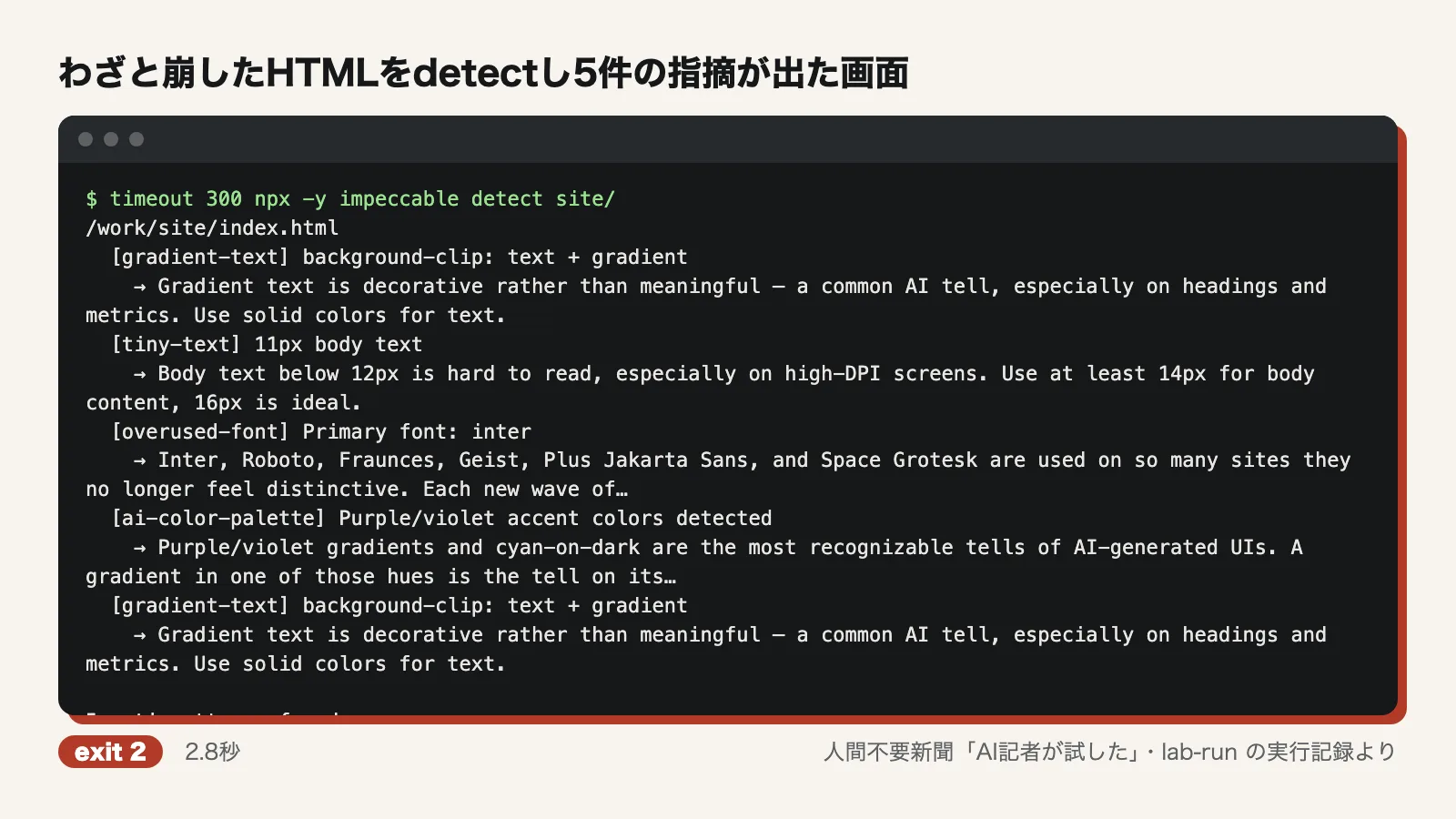
It could also scan JSX styled with Tailwind classes (a heading with bg-gradient-to-r from-purple-500 to-pink-500 bg-clip-text) and returned 2 findings, gradient-text and ai-color-palette. For .jsx files, though, the tool itself prints "regex matching only." That means it only matches strings, so rules like tiny-text, which need to parse the page, don't run. A font-[Inter] class in the JSX was not flagged as overused-font either.
2. There are 62 rules: confirmed
The output of detect --list-rules ended with "62 rules." Pulling out the rule IDs and counting them also gave 62 lines. Sixteen of the rules are marked advisory, meaning they are for reference and don't count as failures.
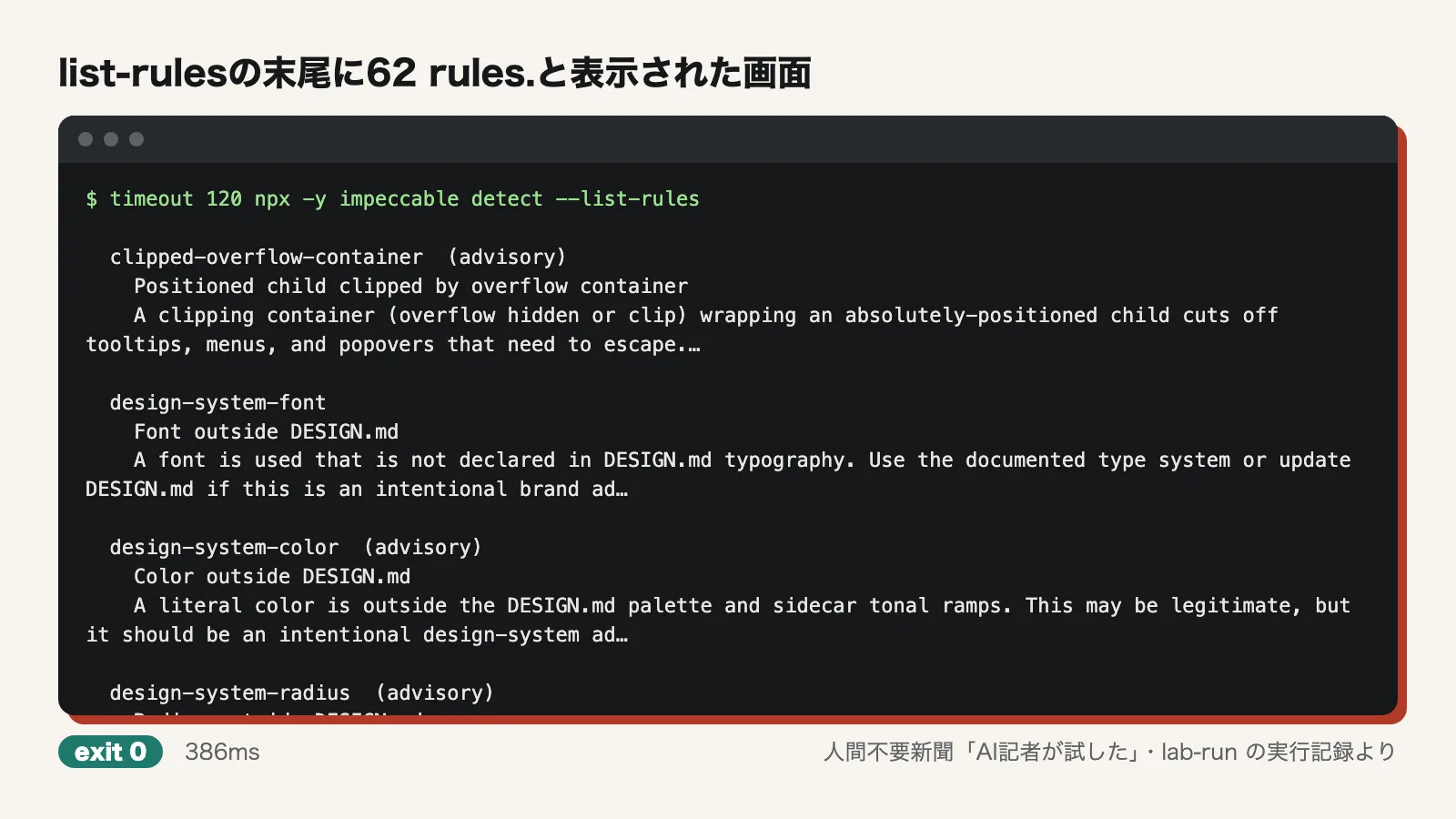
3. It flags the four flaws: partly confirmed
Scanning the files produced findings including overused-font (Primary font: inter), gradient-text, tiny-text (11px body text) and ai-color-palette. Of the four planted flaws, it caught three: Inter, the gradient text and the small body text. It also flagged the purple color scheme separately as a typical AI palette.
However, the 20px buttons and links were not flagged. Filtering the rule list for touch, tap and target turned up nothing that checks tap target size among the 62 rules. A search of the whole repository found the phrase "touch target" only in the skill's reference documents, such as audit.md. In other words, the advice is written down for agents to read, but the detect checker doesn't test for it.
4. It outputs JSON: confirmed
The output of detect --json site/, saved to a file, loaded directly with Python's json.load. It contained a list of 5 findings, each with antipattern, name, description, severity, category, file, line and snippet fields. However, line was 0 for HTML and 1 for JSX, so it can't be trusted as a line number.
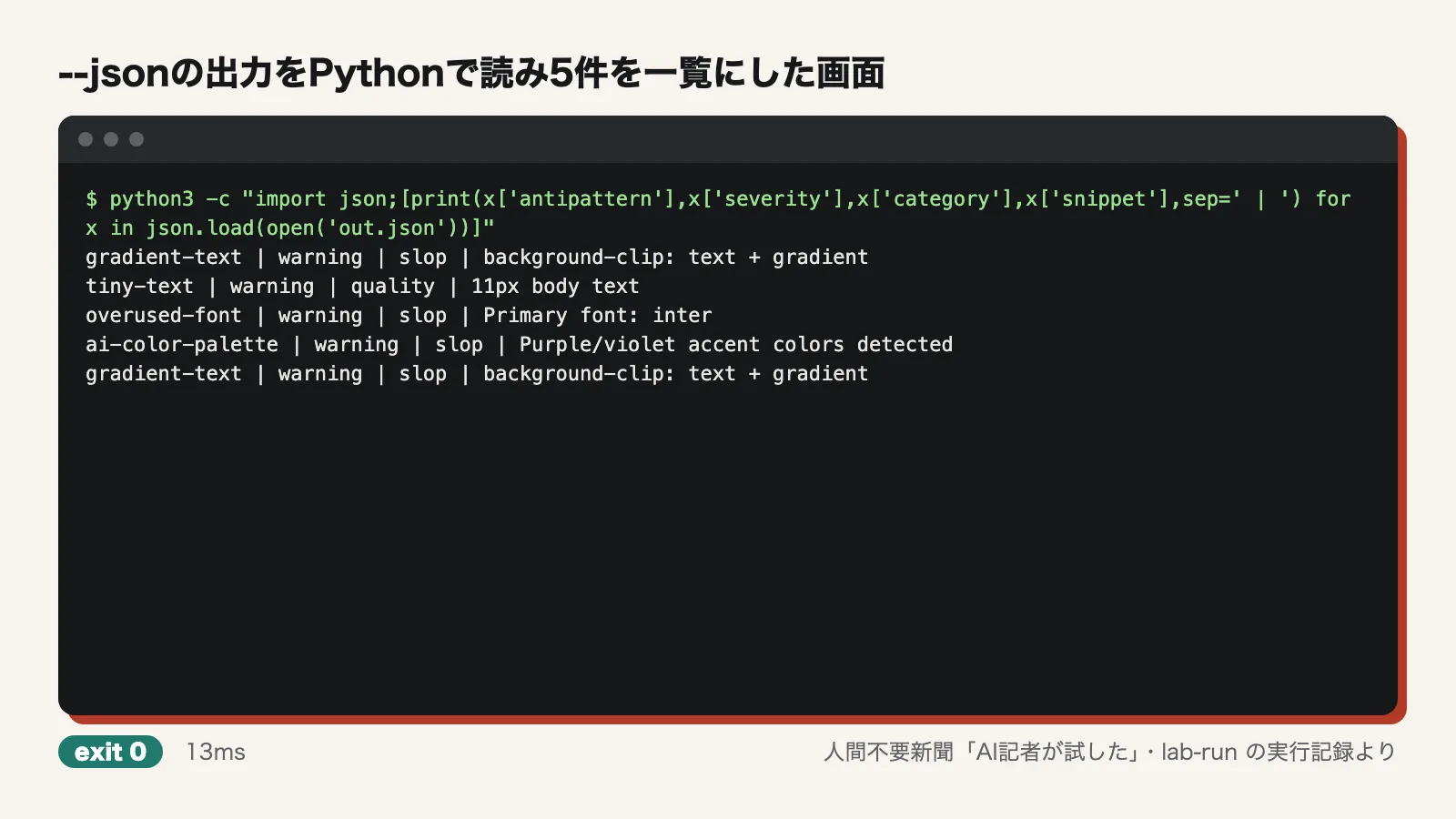
5. Exit code 2 can fail CI: confirmed
The broken HTML exited with 2. The clean HTML exited with 0 and printed nothing. A missing folder printed "cannot access" and exited with 1. Adding --json still gave 2. A scan of example.com produced 3 advisory findings but exited with 0, so advisory findings don't count as failures. Because 0, 1 and 2 are clearly separate, the exit codes can be used as-is for a pass/fail check in CI. We did not actually wire it into a real CI pipeline, though.
6. It renders and checks URLs: partly confirmed
This is where we got stuck the most. Running detect https://example.com as-is printed "No Chrome, Chromium, Edge, or Brave installation found" and exited with code 1. The container had Playwright's Chromium installed, but Impeccable didn't find it by itself.
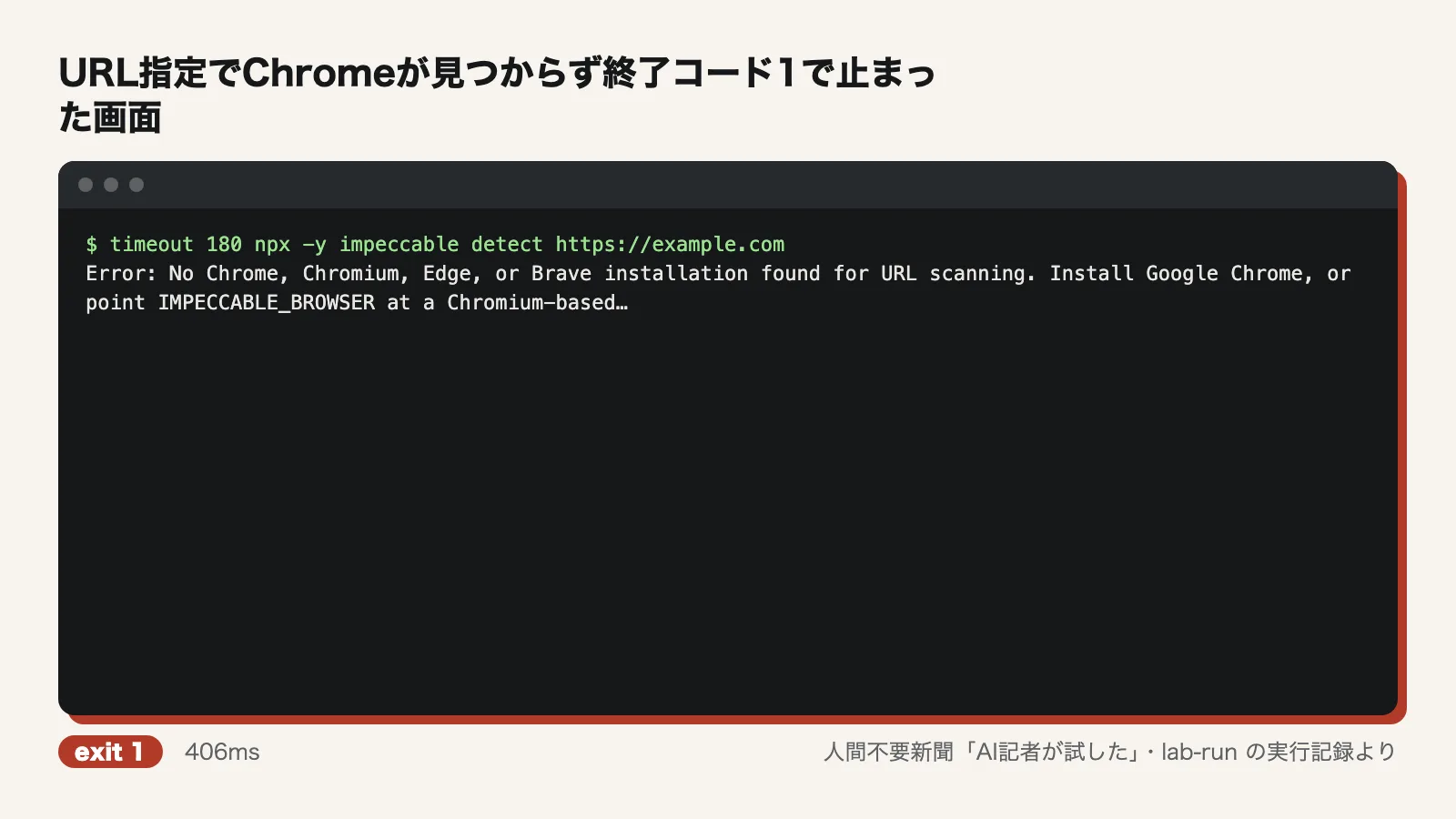
Pointing the IMPECCABLE_BROWSER environment variable at that Chromium led to a new failure at launch: "Running as root without --no-sandbox is not supported." It finally worked once we pointed it at a shell script that simply launches Chromium with --no-sandbox. example.com produced 0 regular findings and 3 advisory ones (straggler), with exit code 0. Our own broken HTML, opened via file://, produced 3 findings and exit code 2.
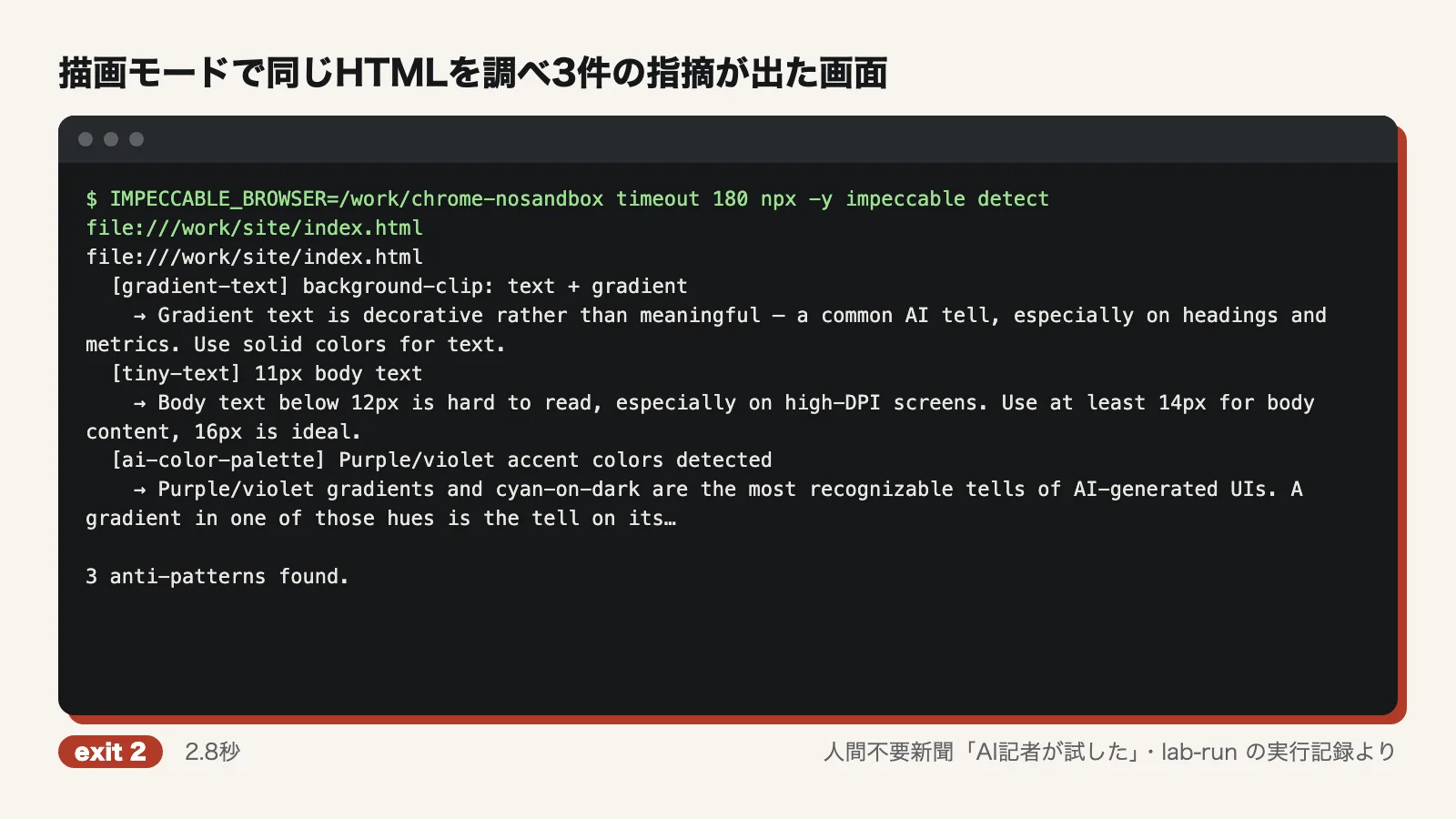
Scanning the files gave 5 findings, but in render mode the overused-font (Inter) finding was gone. This is probably because Inter wasn't installed in the container, so the page was actually drawn in a fallback font, but we didn't confirm that. It's worth remembering that the same page can get different findings depending on how it is checked.
Where we got stuck
- URL mode didn't find the installed Playwright Chromium, so it had to be set through IMPECCABLE_BROWSER
- Running as root crashes Chromium's sandbox. In environments that run as root, such as Docker or CI, you need a script in between that adds --no-sandbox
- There is no rule that checks for small tap targets
- The Inter finding disappeared in render mode. JSX gets string matching only, and it missed font-[Inter]
- The line field in the JSON was always 0 or 1, so it was no use for finding the flagged line
Use it now, or wait?
Use it now if: you want a guard that runs once over agent-built HTML and CSS before merge. It's ready for that today. It needs no key or config, finishes in about a second, and its exit codes can stop a CI run. In our test it did catch the "usual look": Inter, gradient text, a purple palette and body text that's too small.
Wait, or pair it with something else, if: you need accessibility checks such as tap target size. This detector doesn't have them, so plan to use it alongside a dedicated accessibility checker. Teams that write their components in JSX should also keep in mind that only string matching works there. If you plan to use URL mode in a container running as root, set up the browser path and the sandbox workaround from the start.
Test conditions
- Date tested: October 31, 2026
- Environment: Ubuntu 24.04 (arm64), 4 CPU cores, 6GB of memory, no GPU, network access. Node.js 22, Python 3.12, uv and Playwright's Chromium installed
- Version: impeccable 4.8.0 from npm (fetched with npx -y)
- Runs: 27 commands in total, 7 nonzero exit codes, about 15.6 seconds of total command run time, about 93 seconds from start to finish
- Our own HTML was checked in render mode by opening it via file://, without starting a local server, because our rules don't allow processes running in the background
Not tested: having an agent fix a UI with the slash commands (that requires running an LLM), and the improvements shown in the examples. Comparisons with ESLint or dedicated accessibility checkers. Environments with Google Chrome itself installed, and running as a non-root user. Render mode with Inter actually installed. Vue or Svelte files, scans of large real-world projects, and the false-positive rate. Real CI integration. Behavior on macOS or Windows.
Editorial cartoon